Balise HTML <nav>
La balise <nav> est un élément HTML5 utilisé pour définir une section de liens de navigation au sein d'une page web. Cette balise contribue à la fois à la structure et à la sémantique de la page, la rendant plus accessible pour les utilisateurs et les moteurs de recherche. L'élément <nav> peut être utilisé pour regrouper les liens de navigation principaux, tels que les liens vers différentes sections ou pages d'un site web.
La <nav> tag est one of the HTML5 elements. It is used to specify a block of navigation links, either within the current document or to other documents. Examples of navigation blocks are tables of contents, menus, and indexes.
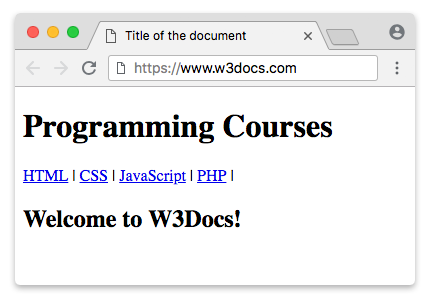
One HTML document may contain several <nav> tags, for example, one for site navigation and one for intra-page navigation.
Note that not all links in the HTML document are placed inside the <nav> element; it includes major navigation blocks. The <nav> tag can be placed for defining links in the footer of the website, but the <footer> tag is usually used in such cases.
DANGER
The <nav> tag cannot be nested in the <address> element.
Syntax
The <nav> tag comes in pairs. The content is written between the opening (<nav>) and closing (</nav>) tags.
Example of using the HTML <nav> tag:
Example of HTML nav tag
<!DOCTYPE html>
<html>
  <head>
    <title>Title of the document</title>
  </head>
  <body>
    <header>
      <h1>Programming Courses</h1>
    </header>
    <nav>
      <a href="/learn-html.html">HTML</a> |
      <a href="/learn-css.html">CSS</a> |
      <a href="/learn-javascript.html">JavaScript</a> |
      <a href="/learn-php.html">PHP</a>
    </nav>
    <h2>Welcome to W3Docs!</h2>
  </body>
</html>Example of the <nav> tag:
Example of HTML nav tag
<!DOCTYPE html>
<html>
  <head>
    <style>
      nav {
        display: flex;
        flex-wrap: wrap;
      }
      nav a {
        text-decoration: none;
        display: block;
        padding: 15px 25px;
        text-align: center;
        background-color: rgb(189, 185, 185);
        color: #464141;
        margin: 0;
        font-family: sans-serif;
      }
      nav a:hover {
        background-color: #777777;
        color: #ffffff;
      }
    </style>
  </head>
  <body>
    <h1>Example of the HTML nav tag:</h1>
    <nav>
      <a href="https://www.w3docs.com/">Home</a>
      <a href="https://www.w3docs.com/quiz/">Quizzes</a>
      <a href="https://www.w3docs.com/snippets">Snippets</a>
      <a href="https://www.w3docs.com/tool/">Tools</a>
      <a href="https://www.w3docs.com/string-functions/">String Functions</a>
    </nav>
  </body>
</html>Example of creating a dropdown menu using the HTML <nav> tag:
Example of the nav tag, when creating dropdown menu
<!DOCTYPE html>
<html>
  <head>
    <style>
      nav ul ul {
        display: none;
      }
      nav ul li:hover > ul {
        display: block;
      }
      nav ul:after {
        content: "";
        clear: both;
        display: block;
      }
      nav ul li {
        float: left;
        position: relative;
        list-style-type: none;
      }
      nav ul li:hover {
        background: rgba(19, 20, 123, 0.67);
      }
      nav ul li:hover a {
        color: #fff;
      }
      nav ul li a {
        display: block;
        padding: 20px 30px;
        color: #ffffff;
        text-decoration: none;
        background-color: rgba(35, 17, 134, 0.8);
        font-family: sans-serif;
      }
      nav ul ul {
        background: #5f6975;
        padding: 0;
        position: absolute;
        top: 100%;
      }
      nav ul ul li {
        float: none;
        position: relative;
      }
      nav ul ul li a {
        padding: 15px 10px;
        color: #ffffff;
        text-transform: uppercase;
      }
      nav ul ul li a:hover {
        background: rgba(19, 20, 123, 0.67);
      }
    </style>
  </head>
  <body>
    <h1>Dropdown menu with the HTML nav tag:</h1>
    <nav>
      <ul>
        <li>
          <a href="https://www.w3docs.com/">Home</a>
        </li>
        <li>
          <a href="https://www.w3docs.com/quiz/">Quizzes</a>
          <ul>
            <li>
              <a href="https://www.w3docs.com/quiz-start/html-basic">HTML Basics</a>
            </li>
            <li>
              <a href="https://www.w3docs.com/quiz-start/css-basic">CSS Basics</a>
            </li>
            <li>
              <a href="https://www.w3docs.com/quiz-start/javascript-basic">JavaScript Basics</a>
            </li>
            <li>
              <a href="https://www.w3docs.com/quiz-start/php-basic">PHP Basics</a>
            </li>
            <li>
              <a href="https://www.w3docs.com/quiz-start/es6-basic">ES6 Basics</a>
            </li>
          </ul>
        </li>
        <li>
          <a href="https://www.w3docs.com/snippets">Snippets</a>
          <ul>
            <li>
              <a href="https://www.w3docs.com/snippets/angularjs.html">Angular JS</a>
            </li>
            <li>
              <a href="https://www.w3docs.com/snippets/apache.html">Apache</a>
            </li>
            <li>
              <a href="https://www.w3docs.com/snippets/git.html">Git</a>
            </li>
            <li>
              <a href="https://www.w3docs.com/snippets/linux.html">Linux</a>
            </li>
            <li>
              <a href="https://www.w3docs.com/snippets/nodejs.html">Node.Js</a>
            </li>
            <li>
              <a href="https://www.w3docs.com/snippets/symfony.html">Symfony</a>
            </li>
          </ul>
        </li>
        <li>
          <a href="https://www.w3docs.com/tool/">Tools</a>
          <ul>
            <li>
              <a href="https://www.w3docs.com/tools/html-encoder/">HTML ENCODER/DECODER</a>
            </li>
            <li>
              <a href="https://www.w3docs.com/css3-maker/border-radius">CSS MAKER</a>
            </li>
            <li>
              <a href="https://www.w3docs.com/tools/password-generator">PASSWORD GENERATOR</a>
            </li>
            <li>
              <a href="https://www.w3docs.com/tools/image-base64">Base 64</a>
            </li>
            <li>
              <a href="https://www.w3docs.com/tools/code-diff/">CODE DIFF</a>
            </li>
          </ul>
        </li>
        <li>
          <a href="https://www.w3docs.com/string-functions/">String Functions</a>
          <ul>
            <li>
              <a href="https://www.w3docs.com/tools/string-revers">STRING REVERSE</a>
            </li>
            <li>
              <a href="https://www.w3docs.com/tools/string-word-count">STRING WORD COUNT</a>
            </li>
            <li>
              <a href="https://www.w3docs.com/tools/string-remove-empty-lines">EMPTY LINES REMOVER</a>
            </li>
          </ul>
        </li>
      </ul>
    </nav>
  </body>
</html>Attributes
The <nav> tag supports the Global Attributes and the Event Attributes.. Note that global attributes apply to all HTML elements.
How to style an HTML <nav> Tag
nav {
  background-color: #333;
  padding: 10px;
}
nav a {
  color: white;
  text-decoration: none;
  margin-right: 15px;
}
Practice
Quel est l'objectif et l'utilisation de la balise <nav> en HTML ?