Balise HTML <section>
La balise HTML <section> fait partie des éléments HTML5. Elle est utilisée pour créer des sections autonomes au sein d'une page web contenant du contenu logiquement lié (bloc d'actualités, informations de contact, etc.). La balise <section> est souvent utilisée lors de la création d'une page d'atterrissage pour diviser la page en blocs logiques distincts.
Par exemple, un menu de navigation doit être enveloppé dans une balise <nav>, mais l'affichage d'une carte et une liste de résultats de recherche n'ont pas d'éléments spécifiques et peuvent être placés à l'intérieur d'un <section>.
La balise <section> peut être imbriquée dans la balise <article>, divisant ainsi le contenu en groupes. HTML5 recommande d'inclure un titre (<h1>–<h6>) pour chaque section afin d'en définir le sujet. Bien que n'importe quel niveau de titre puisse être utilisé, il est recommandé de suivre une hiérarchie logique basée sur la structure d'imbrication.
DANGER
N'utilisez pas la balise <section> comme conteneur universel pour créer la structure de la page ; vous devriez utiliser la balise <div> à cette fin.
Syntaxe
La balise <section> s'utilise par paires. Le contenu est écrit entre la balise d'ouverture (<section>) et la balise de fermeture (</section>).
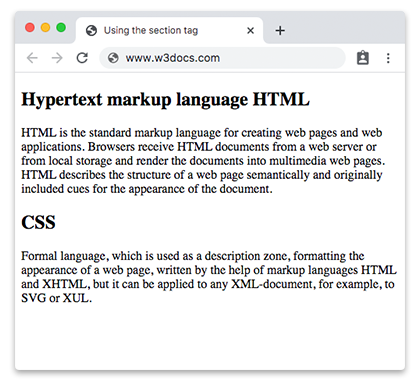
Exemple de la balise HTML <section> :
Exemple de la balise HTML <section>
<!DOCTYPE html>
<html>
  <head>
    <title>Using the section tag</title>
  </head>
  <body>
    <section>
      <h2>Hypertext markup language HTML</h2>
      <p>HTML is the standard markup language for creating web pages and web applications. Browsers receive HTML documents from a web server or from local storage and render the documents into multimedia web pages. HTML describes the structure of a web page semantically and originally included cues for the appearance of the document.</p>
    </section>
    <section>
      <h2>CSS</h2>
      <p>Formal language, which is used as a description zone, formatting the appearance of a web page, written by the help of markup languages HTML and XHTML, but it can be applied to any XML-document, for example, to SVG or XUL.</p>
    </section>
  </body>
</html>Résultat
Exemple de la balise HTML <section> à l'intérieur d'une autre balise <section> :
Exemple de la balise HTML <section> à l'intérieur d'une autre balise <section>
<!DOCTYPE html>
<html>
  <head>
    <title>Title of the document</title>
  </head>
  <body>
    <h1>Example of the section tag</h1>
    <section>
      <h2>Hypertext markup language HTML</h2>
      <p>
        HTML is the standard markup language for creating web pages and web applications. Browsers receive HTML documents from a web server or from local storage and render the documents into multimedia web pages. HTML describes the structure of a web page semantically and originally included cues for the appearance of the document.
      </p>
      <section>
        <h3>Hypertext markup language HTML</h3>
        <p>HTML is the standard markup language for creating web pages and web applications. Browsers receive HTML documents from a web server or from local storage and render the documents into multimedia web pages. HTML describes the structure of a web page semantically and originally included cues for the appearance of the document.</p>
      </section>
    </section>
    <section>
      <h2>CSS</h2>
      <p>Formal language, which is used as a description zone, formatting the appearance of a web page, written by the help of markup languages HTML and XHTML, but it can be applied to any XML-document, for example, to SVG or XUL.</p>
    </section>
  </body>
</html>Attributs
La balise <section> prend en charge les Attributs globaux et les Attributs d'événement.
Comment styliser une balise HTML <section>
section {
  background-color: #f9f9f9;
  padding: 20px;
  border: 1px solid #ddd;
}
Pratique
Quelle est l'utilité de la balise Section en HTML ?