Propriété CSS flex-grow
La propriété flex-grow définit la capacité d'un élément à s'agrandir. Découvrez ses valeurs et des exemples pratiques.
La propriété flex-grow contrôle dans quelle mesure un élément flex grandit pour occuper l'espace libre restant à l'intérieur de son conteneur flex. La valeur est un facteur de croissance sans unité, et non une longueur : elle répond à la question « lorsqu'il y a de l'espace supplémentaire, quelle part cet élément doit-il prendre ? »
Lorsque chaque élément possède un facteur flex-grow, l'espace restant est distribué proportionnellement à ces facteurs. La taille principale d'un élément flex correspond à sa largeur ou à sa hauteur, selon la flex-direction : dans une rangée, les éléments grandissent horizontalement ; dans une colonne, ils grandissent verticalement.
Cette propriété fait partie des propriétés CSS3. Elle est généralement utilisée conjointement avec flex-shrink (comment les éléments rétrécissent quand l'espace est insuffisant) et flex-basis (leur taille de départ), et les trois sont habituellement définis en une seule fois via la propriété raccourcie flex.
Comment l'espace libre est distribué
L'algorithme flex s'exécute en deux étapes :
- Disposer chaque élément selon sa
flex-basis(ou sa taille de contenu siflex-basis: auto). - Mesurer l'espace libre — la taille principale du conteneur moins la somme de ces tailles de base — et le distribuer proportionnellement au facteur
flex-growde chaque élément.
Si les éléments ci-dessus commencent avec une largeur proche de zéro et que le conteneur dispose, par exemple, de 600px d'espace libre avec des facteurs 1, 2, 1, 1, 1 (total 6), chaque unité vaut 600 / 6 = 100px. Ainsi, l'élément avec le facteur 2 reçoit 200px de croissance, tandis que chaque élément avec le facteur 1 reçoit 100px. Doubler le facteur double la part de l'espace supplémentaire — cela ne rend pas un élément deux fois plus large au total.
flex-grow ne produit un effet que lorsqu'il y a de l'espace libre et que les éléments sont de véritables éléments flex (le parent a display: flex ou display: inline-flex). Sans espace libre, ou sans éléments flex, il n'a aucun effet.
| Valeur initiale | 0 |
|---|---|
| S'applique à | Les éléments flex, y compris les pseudo-éléments dans le flux. |
| Héritée | Non. |
| Animatable | Oui. Les éléments sont animables. |
| Version | CSS3 |
| Syntaxe DOM | object.style.flexGrow = 3; |
Syntaxe
Syntaxe de la propriété CSS flex-grow
flex-grow: number | initial | inherit;Exemple de la propriété flex-grow :
Exemple de la propriété CSS flex-grow avec une valeur numérique
<!DOCTYPE html>
<html>
  <head>
    <title>Title of the document</title>
    <style>
      .box {
        width: 320px;
        height: 120px;
        border: 2px solid #cccccc;
        display: flex;
      }
      .box div:nth-of-type(1) {
        flex-grow: 1;
      }
      .box div:nth-of-type(2) {
        flex-grow: 2;
      }
      .box div:nth-of-type(3) {
        flex-grow: 1;
      }
      .box div:nth-of-type(4) {
        flex-grow: 1;
      }
      .box div:nth-of-type(5) {
        flex-grow: 1;
      }
    </style>
  </head>
  <body>
    <h2>Flex-grow property example</h2>
    <div class="box">
      <div style="background-color: #eeeeee;"></div>
      <div style="background-color: #1c87c9;"></div>
      <div style="background-color: #8ebf42;"></div>
      <div style="background-color: #cccccc;"></div>
      <div style="background-color: #666666;"></div>
    </div>
  </body>
</html>Résultat
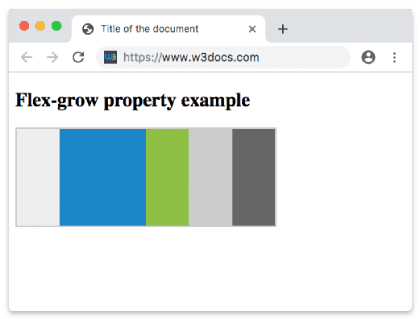
Exemple de la propriété flex-grow avec un facteur de croissance plus élevé :
Propriété CSS flex-grow avec un nombre comme valeur
<!DOCTYPE html>
<html>
  <head>
    <title>The title of the document</title>
    <style>
      .box {
        width: 320px;
        height: 120px;
        border: 2px solid #cccccc;
        display: flex;
      }
      .box div:nth-of-type(1) {
        flex-grow: 1;
      }
      .box div:nth-of-type(2) {
        flex-grow: 6;
      }
      .box div:nth-of-type(3) {
        flex-grow: 1;
      }
      .box div:nth-of-type(4) {
        flex-grow: 1;
      }
      .box div:nth-of-type(5) {
        flex-grow: 1;
      }
    </style>
  </head>
  <body>
    <h2>Flex-grow property example</h2>
    <div class="box">
      <div style="background-color: #eeeeee;"></div>
      <div style="background-color: #1c87c9;"></div>
      <div style="background-color: #8ebf42;"></div>
      <div style="background-color: #cccccc;"></div>
      <div style="background-color: #666666;"></div>
    </div>
  </body>
</html>Utiliser flex-grow dans la propriété raccourcie flex
On écrit rarement flex-grow seul. Le schéma le plus courant est flex: 1, qui est l'abréviation de flex-grow: 1; flex-shrink: 1; flex-basis: 0. Définir la base à 0 indique au navigateur d'ignorer la taille du contenu et de diviser le conteneur entier proportionnellement, de sorte que plusieurs éléments avec flex: 1 se retrouvent exactement de même largeur :
.item {
  flex: 1; /* grow:1  shrink:1  basis:0  → equal columns */
}Pour permettre à un élément d'occuper deux fois la part des autres, augmentez son facteur de croissance :
.sidebar { flex: 1; }
.main { flex: 2; } /* gets 2/3 of the space, sidebar gets 1/3 */Pièges courants
- Facteur, pas largeur.
flex-grow: 2ne signifie pas « deux fois plus large » — cela signifie « deux fois la part de l'espace restant ». Lorsque les éléments ont des tailles de contenu différentes, les largeurs finales ne formeront pas un rapport propre de 2:1 à moins queflex-basissoit0. - Les valeurs négatives sont invalides. Elles sont ignorées et la propriété conserve sa valeur précédente.
- Pas d'espace libre, pas d'effet. Si les éléments remplissent déjà (ou débordent de) le conteneur,
flex-growne change rien — ce cas est géré par flex-shrink à la place. - Le facteur est sans unité. N'écrivez pas
flex-grow: 2px; ce n'est pas une valeur valide.
Valeurs
| Valeur | Description | Essayer |
|---|---|---|
| number | Spécifie dans quelle mesure l'élément grandira par rapport aux autres éléments flexibles du même conteneur. La valeur par défaut est 0. | Essayer » |
| initial | Définit la propriété à sa valeur par défaut. | Essayer » |
| inherit | Hérite de cette propriété depuis son élément parent. |