Propriété CSS flex-wrap
La propriété CSS flex-wrap définit si les éléments doivent passer à la ligne ou non. Découvrez des exemples avec différentes valeurs.
La propriété flex-wrap contrôle si les éléments d'un conteneur flex sont forcés sur une seule ligne ou autorisés à passer sur plusieurs lignes. Par défaut, un conteneur flex essaie de faire tenir tous ses éléments sur une seule ligne, même si cela signifie les rétrécir ou les laisser déborder. Définir flex-wrap: wrap indique aux éléments qu'ils peuvent passer sur de nouvelles lignes lorsqu'il n'y a pas suffisamment de place.
C'est la propriété à utiliser dès qu'une rangée de cartes, d'étiquettes ou de liens de navigation doit se réorganiser élégamment sur les écrans étroits au lieu de déborder ou d'être écrasée.
flex-wrap n'affecte que les éléments qui sont des flex items, donc elle n'a aucun effet si le parent n'a pas display: flex (ou display: inline-flex). Si un conteneur flex ne contient aucun élément, la propriété ne fait rien.
La propriété flex-wrap fait partie des propriétés CSS3, et elle est étroitement liée à flex-direction : ensemble, elles s'écrivent couramment sous forme de la propriété raccourcie flex-flow.
Ce chapitre explique chaque valeur de flex-wrap, comment le retour à la ligne interagit avec l'axe principal, et les pièges à éviter.
| Valeur initiale | nowrap |
|---|---|
| S'applique à | Les conteneurs flex. |
| Hérité | Non. |
| Animable | Non. |
| Version | CSS3 |
| Syntaxe DOM | object.style.flexWrap = "wrap-reverse"; |
Fonctionnement du retour à la ligne
Le retour à la ligne se produit le long de l'axe transversal, perpendiculairement à l'axe principal défini par flex-direction :
- Avec le
flex-direction: rowpar défaut, les éléments se disposent de gauche à droite. Lorsqueflex-wrap: wrapest activé et que les éléments manquent d'espace horizontal, l'élément suivant commence sur une nouvelle ligne en dessous. - Avec
flex-direction: column, les éléments s'empilent de haut en bas, et le retour à la ligne pousse les éléments qui débordent dans une nouvelle colonne à côté de la première.
Conséquence importante : quand flex-wrap est nowrap (la valeur par défaut), les flex items rétrécissent pour s'adapter au conteneur (leur flex-shrink entre en jeu) ou en débordent. Ce n'est qu'une fois le retour à la ligne autorisé que les éléments conservent leur taille préférée et passent sur une nouvelle ligne à la place.
Lorsque les éléments passent sur plusieurs lignes, l'espace entre ces lignes est contrôlé par align-content, tandis que l'alignement des éléments au sein d'une seule ligne est contrôlé par align-items. Sur une seule ligne sans retour à la ligne, align-content n'a aucun effet.
Syntaxe
Syntaxe de la propriété CSS flex-wrap
flex-wrap: nowrap | wrap | wrap-reverse | initial | inherit;Exemple de la propriété flex-wrap avec la valeur "wrap" :
Le conteneur ci-dessous fait 200px de large et contient six boîtes de 50px de large (300px de contenu). Avec flex-wrap: wrap, les boîtes qui ne tiennent pas sur la première ligne passent sur une deuxième ligne au lieu de rétrécir :
Exemple de la propriété CSS flex-wrap avec la valeur wrap
<!DOCTYPE html>
<html>
  <head>
    <title>Title of the document</title>
    <style>
      .wrap {
        width: 200px;
        height: 200px;
        border: 1px solid #cccccc;
        display: flex;
        flex-wrap: wrap;
      }
      .wrap div {
        width: 50px;
        height: 50px;
      }
    </style>
  </head>
  <body>
    <h2>The flex-wrap Property</h2>
    <div class="wrap">
      <div style="background-color:coral;">A</div>
      <div style="background-color:lightblue;">B</div>
      <div style="background-color:khaki;">C</div>
      <div style="background-color:pink;">D</div>
      <div style="background-color:lightgrey;">E</div>
      <div style="background-color:lightgreen;">F</div>
    </div>
  </body>
</html>Exemple de la propriété flex-wrap avec la valeur "nowrap" :
Avec la valeur par défaut nowrap, les six mêmes boîtes sont forcées sur une seule ligne. Comme elles ne peuvent pas toutes tenir, elles sont compressées à une largeur inférieure à leur largeur déclarée de 50px :
Exemple de la propriété CSS flex-wrap avec la valeur nowrap
<!DOCTYPE html>
<html>
  <head>
    <title>Title of the document</title>
    <style>
      .example {
        width: 200px;
        height: 200px;
        border: 1px solid #c3c3c3;
        display: flex;
        flex-wrap: nowrap;
      }
      .example div {
        width: 50px;
        height: 50px;
      }
    </style>
  </head>
  <body>
    <h2>Flex-wrap property example</h2>
    <div class="example">
      <div style="background-color: #8ebf42;">A</div>
      <div style="background-color: #1c87c9;">B</div>
      <div style="background-color: #cccccc;">C</div>
      <div style="background-color: #666666;">D</div>
      <div style="background-color: #4c4a4a;">E</div>
      <div style="background-color: #c6c4c4;">F</div>
    </div>
  </body>
</html>Résultat
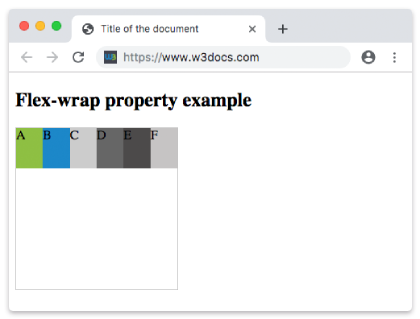
Exemple de la propriété flex-wrap avec la valeur "wrap-reverse" :
wrap-reverse permet également aux éléments de passer sur plusieurs lignes, mais il inverse la direction de l'axe transversal : les lignes s'empilent vers le haut au lieu de vers le bas, de sorte que la première ligne apparaît en bas :
Exemple de la propriété CSS flex-wrap avec la valeur wrap-reverse
<!DOCTYPE html>
<html>
  <head>
    <title>Title of the document</title>
    <style>
      .example {
        width: 200px;
        height: 200px;
        border: 1px solid #c3c3c3;
        display: flex;
        flex-wrap: wrap-reverse;
      }
      .example div {
        width: 50px;
        height: 50px;
      }
    </style>
  </head>
  <body>
    <h2>Flex-wrap property example</h2>
    <div class="example">
      <div style="background-color: #8ebf42;">A</div>
      <div style="background-color: #1c87c9;">B</div>
      <div style="background-color: #cccccc;">C</div>
      <div style="background-color: #666666;">D</div>
      <div style="background-color: #4c4a4a;">E</div>
      <div style="background-color: #c6c4c4;">F</div>
    </div>
  </body>
</html>Valeurs
| Valeur | Description | Essayer |
|---|---|---|
| nowrap | Définit que les flex items ne passeront pas à la ligne. C'est la valeur par défaut de cette propriété. | Essayer » |
| wrap | Définit que les flex items passeront à la ligne si nécessaire. | Essayer » |
| wrap-reverse | Définit que les flex items passeront à la ligne dans l'ordre inverse si nécessaire. | Essayer » |
| initial | Applique la valeur par défaut de la propriété. | Essayer » |
| inherit | Hérite la propriété de son élément parent. |
Propriété raccourcie flex-flow
Comme flex-wrap est presque toujours défini avec flex-direction, CSS fournit la propriété raccourcie flex-flow pour les deux à la fois :
/* flex-direction  flex-wrap */
flex-flow: row wrap;C'est équivalent à écrire flex-direction: row; et flex-wrap: wrap; séparément.
Propriétés associées
display— définissezdisplay: flexsur le parent pour créer le conteneur flex sur lequelflex-wrapagit.flex-direction— définit l'axe principal (ligne ou colonne) autour duquel le retour à la ligne se réorganise.align-content— distribue l'espace entre les lignes qui ont été renvoyées à la ligne (ne s'applique que lorsque les éléments passent à la ligne).justify-content— aligne les éléments le long de l'axe principal.flex— contrôle la façon dont les éléments individuels s'agrandissent et rétrécissent pour remplir chaque ligne.