Propriété CSS align-content
La propriété CSS align-content aligne les lignes d'un conteneur flex lorsqu'il y a de l'espace disponible sur l'axe transversal.
La propriété align-content fait partie des propriétés CSS3.
Lorsqu'il n'y a qu'une seule ligne dans le flexbox, cette propriété n'a aucun effet. Elle nécessite plusieurs lignes au sein d'un conteneur flexible.
La valeur stretch est la valeur par défaut de cette propriété.
La propriété align-content accepte les valeurs suivantes :
- flex-start
- flex-end
- center
- space-between
- space-around
- space-evenly
- stretch
| Valeur initiale | stretch |
|---|---|
| S'applique à | Conteneurs flex multi-lignes. |
| Héritée | Non. |
| Animable | Non. |
| Version | CSS3 |
| Syntaxe DOM | object.style.alignContent = "flex-end"; |
Syntaxe
Syntaxe de la propriété CSS align-content
css
align-content: flex-start | flex-end | center | space-between | space-around | space-evenly | stretch | initial | inherit;Exemple de la propriété align-content avec la valeur stretch :
html
<!DOCTYPE html>
<html>
  <head>
    <title>Title of the document</title>
    <style>
      #example {
        width: 70px;
        height: 300px;
        padding: 0;
        border: 1px solid #c3c3c3;
        display: flex;
        flex-flow: row wrap;
        align-content: stretch;
      }
      #example li {
        width: 70px;
        height: 70px;
        list-style: none;
      }
    </style>
  </head>
  <body>
    <h2>Align-content: stretch; example</h2>
    <ul id="example">
      <li style="background-color:#8ebf42;"></li>
      <li style="background-color:#1c87c9;"></li>
      <li style="background-color:#666;"></li>
    </ul>
  </body>
</html>Résultat
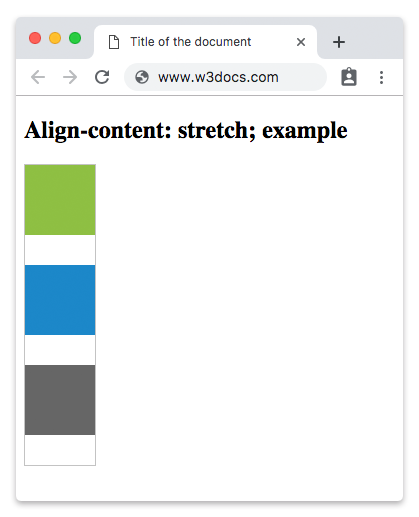
Exemple de la propriété align-content avec la valeur "center" :
html
<!DOCTYPE html>
<html>
  <head>
    <style>
      #example {
        width: 70px;
        height: 300px;
        padding: 0;
        border: 1px solid #c3c3c3;
        display: flex;
        flex-flow: row wrap;
        align-content: center;
      }
      #example li {
        width: 70px;
        height: 70px;
        list-style: none;
      }
    </style>
  </head>
  <body>
    <h2>Align-content: center; example</h2>
    <ul id="example">
      <li style="background-color:#8ebf42;"></li>
      <li style="background-color:#1c87c9;"></li>
      <li style="background-color:#666;"></li>
    </ul>
  </body>
</html>Exemple de la propriété align-content avec la valeur "flex-start" :
html
<!DOCTYPE html>
<html>
  <head>
    <style>
      #example {
        width: 70px;
        height: 300px;
        padding: 0;
        border: 1px solid #c3c3c3;
        display: flex;
        flex-flow: row wrap;
        align-content: flex-start;
      }
      #example li {
        width: 70px;
        height: 70px;
        list-style: none;
      }
    </style>
  </head>
  <body>
    <h2>Align-content: flex-start; example</h2>
    <ul id="example">
      <li style="background-color:#8ebf42;"></li>
      <li style="background-color:#1c87c9;"></li>
      <li style="background-color:#666;"></li>
    </ul>
  </body>
</html>Exemple de la propriété align-content avec la valeur "flex-end" :
html
<!DOCTYPE html>
<html>
  <head>
    <style>
      #example {
        width: 70px;
        height: 300px;
        padding: 0;
        border: 1px solid #c3c3c3;
        display: flex;
        flex-flow: row wrap;
        align-content: flex-end;
      }
      #example li {
        width: 70px;
        height: 70px;
        list-style: none;
      }
    </style>
  </head>
  <body>
    <h2>Align-content: flex-end; example</h2>
    <ul id="example">
      <li style="background-color:#8ebf42;"></li>
      <li style="background-color:#1c87c9;"></li>
      <li style="background-color:#666;"></li>
    </ul>
  </body>
</html>Dans l'exemple suivant, l'espace est réparti uniformément entre les lignes flex.
Exemple de la propriété align-content avec la valeur "space-between" :
html
<!DOCTYPE html>
<html>
  <head>
    <style>
      #example {
        width: 70px;
        height: 300px;
        padding: 0;
        border: 1px solid #c3c3c3;
        display: flex;
        flex-flow: row wrap;
        align-content: space-between;
      }
      #example li {
        width: 70px;
        height: 70px;
        list-style: none;
      }
    </style>
  </head>
  <body>
    <h2>Align-content: space-between; example</h2>
    <ul id="example">
      <li style="background-color:#8ebf42;"></li>
      <li style="background-color:#1c87c9;"></li>
      <li style="background-color:#666;"></li>
    </ul>
  </body>
</html>Résultat
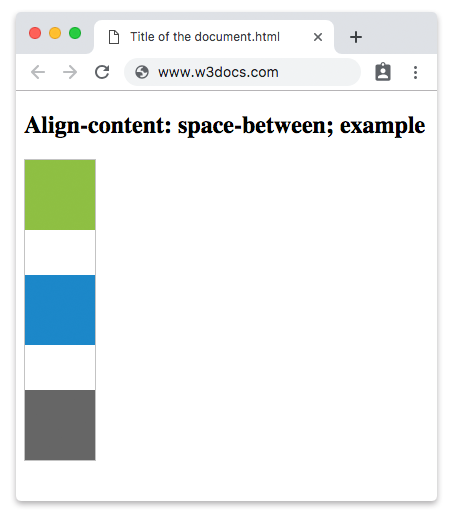
Un autre exemple avec la valeur "space-around". Il y a un espace égal entre les lignes flex.
Exemple de la propriété align-content avec la valeur “space-around” :
html
<!DOCTYPE html>
<html>
  <head>
    <style>
      #example {
        width: 70px;
        height: 300px;
        padding: 0;
        border: 1px solid #c3c3c3;
        display: flex;
        flex-flow: row wrap;
        align-content: space-around;
      }
      #example li {
        width: 70px;
        height: 70px;
        list-style: none;
      }
    </style>
  </head>
  <body>
    <h2>Align-content: space-around; example</h2>
    <ul id="example">
      <li style="background-color:#8ebf42;"></li>
      <li style="background-color:#1c87c9;"></li>
      <li style="background-color:#666;"></li>
    </ul>
  </body>
</html>Valeurs
| Valeur | Description | Tester » |
|---|---|---|
| stretch | Étire les éléments pour qu'ils s'adaptent au conteneur. Il s'agit de la valeur par défaut de cette propriété. | Tester » |
| center | Les éléments sont placés au centre du conteneur. | Tester » |
| flex-start | Les éléments sont placés au début du conteneur. | Tester » |
| flex-end | Les éléments sont placés à la fin du conteneur. | Tester » |
| space-between | Répartit l'espace uniformément entre les lignes flex. | Tester » |
| space-around | Les éléments sont répartis avec un espace égal entre eux. | Tester » |
| space-evenly | Répartit les éléments avec un espace égal entre eux, ainsi qu'avant le premier et après le dernier élément. | Tester » |
| initial | Définit la valeur par défaut de la propriété. | Tester » |
| inherit | Hérite la propriété de son élément parent. |
Pratique
Quelles sont les valeurs possibles pour la propriété CSS align-content ?