Propriété CSS column-rule-color
La propriété column-rule-color définit la couleur de la règle.
La propriété column-rule-color fait partie des propriétés CSS3.
La couleur de la règle peut également être spécifiée par la propriété abrégée column-rule.
Vous pouvez trouver les couleurs web dans notre section Couleurs HTML et essayer de choisir vos couleurs préférées avec notre outil Sélecteur de couleurs.
| Valeur initiale | currentColor |
|---|---|
| S'applique à | Éléments multicol. |
| Héritée | Non. |
| Animable | Oui. La couleur de la règle est animable. |
| Version | CSS3 |
| Syntaxe DOM | object.style.columnRuleColor = "#666"; |
Syntaxe
Syntaxe de la propriété CSS column-rule-color
column-rule-color: color | initial | inherit;Exemple de la propriété column-rule-color :
Exemple de la propriété CSS column-rule-color avec la valeur lightgreen
<!DOCTYPE html>
<html>
  <head>
    <title>Title of the document</title>
    <style>
      div {
        column-count: 3;
        column-gap: 20px;
        column-rule-style: dashed;
        column-rule-color: lightgreen;
      }
    </style>
  </head>
  <body>
    <h1>The column-rule-color example</h1>
    <div>
      Lorem Ipsum is dummy text of the printing and typesetting industry. Lorem Ipsum has been the industry's standard dummy text ever since the 1500s when an unknown printer took a galley of type and scrambled it to make a type specimen book. It has survived not only five centuries, but also the leap into electronic typesetting, remaining essentially unchanged. It was popularised in the 1960s with the release of Letraset sheets containing Lorem Ipsum passages, and more recently with desktop publishing software like Aldus PageMaker including versions of Lorem Ipsum.
    </div>
  </body>
</html>INFO
Vous pouvez définir des valeurs hexadécimales, RGB, RGBA, HSL, HSLA ou des noms de couleurs comme valeur pour la propriété column-rule-color.
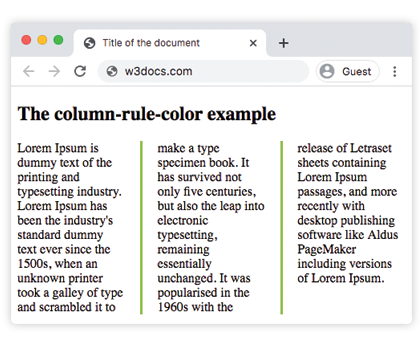
Exemple de la propriété column-rule-color avec la valeur « hexadécimale » :
Exemple de la propriété CSS column-rule-color avec une valeur hexadécimale
<!DOCTYPE html>
<html>
  <head>
    <title>Title of the document</title>
    <style>
      div {
        column-count: 3;
        column-gap: 40px;
        column-rule-style: solid;
        column-rule-color: #8ebf42;
      }
    </style>
  </head>
  <body>
    <h1>The column-rule-color example</h1>
    <div>
      Lorem Ipsum is dummy text of the printing and typesetting industry. Lorem Ipsum has been the industry's standard dummy text ever since the 1500s, when an unknown printer took a galley of type and scrambled it to make a type specimen book. It has survived not only five centuries, but also the leap into electronic typesetting, remaining essentially unchanged. It was popularised in the 1960s with the release of Letraset sheets containing Lorem Ipsum passages, and more recently with desktop publishing software like Aldus PageMaker including versions of Lorem Ipsum.
    </div>
  </body>
</html>Résultat
Exemple de la propriété column-rule-color avec la valeur « RGB » :
Exemple de la propriété CSS column-rule-color avec une valeur RGB
<!DOCTYPE html>
<html>
  <head>
    <title>Title of the document</title>
    <style>
      div {
        column-count: 3;
        column-gap: 40px;
        column-rule-style: double;
        column-rule-color: rgb(234, 211, 21);
      }
    </style>
  </head>
  <body>
    <h1>The column-rule-color example</h1>
    <div>
      Lorem Ipsum is dummy text of the printing and typesetting industry. Lorem Ipsum has been the industry's standard dummy text ever since the 1500s, when an unknown printer took a galley of type and scrambled it to make a type specimen book. It has survived not only five centuries, but also the leap into electronic typesetting, remaining essentially unchanged. It was popularised in the 1960s with the release of Letraset sheets containing Lorem Ipsum passages, and more recently with desktop publishing software like Aldus PageMaker including versions of Lorem Ipsum.
    </div>
  </body>
</html>Exemple de la propriété column-rule-color avec la valeur « HSL » :
Exemple de la propriété CSS column-rule-color avec une valeur HSL
<!DOCTYPE html>
<html>
  <head>
    <title>Title of the document</title>
    <style>
      div {
        column-count: 3;
        column-gap: 30px;
        column-rule-style: solid;
        column-rule-color: hsl(351, 97%, 57%);
      }
    </style>
  </head>
  <body>
    <h1>The column-rule-color example</h1>
    <div>
      Lorem Ipsum is dummy text of the printing and typesetting industry. Lorem Ipsum has been the industry's standard dummy text ever since the 1500s, when an unknown printer took a galley of type and scrambled it to make a type specimen book. It has survived not only five centuries, but also the leap into electronic typesetting, remaining essentially unchanged. It was popularised in the 1960s with the release of Letraset sheets containing Lorem Ipsum passages, and more recently with desktop publishing software like Aldus PageMaker including versions of Lorem Ipsum.
    </div>
  </body>
</html>Valeurs
| Valeur | Description | Tester » |
|---|---|---|
| color | Définit la couleur de la règle. Les noms de couleurs, les codes hexadécimaux, rgb(), rgba(), hsl(), hsla() peuvent être utilisés. | Tester » |
| initial | Définit la propriété à sa valeur par défaut. | Tester » |
| inherit | Hérite la propriété de son élément parent. |
Pratique
Quel est l'objectif de la propriété CSS 'column-rule-color' ?