Propriété CSS text-align-last
La propriété CSS text-align-last définit l'alignement de la dernière ligne du texte. Il s'agit de l'une des propriétés CSS3.
La propriété text-align-last définit l'alignement de la dernière ligne du conteneur de bloc auquel elle est appliquée. Par exemple, si un <div> contient trois paragraphes, text-align-last ne s'appliquera qu'à la dernière ligne du <div> lui-même, et non aux paragraphes individuels qu'il contient.
note
Cette propriété est particulièrement visible lorsque
text-align: justifyest utilisé et que le texte s'enchaîne sur plusieurs lignes. Sur une seule ligne, elle se comporte de manière identique àtext-align.
| Valeur initiale | auto |
|---|---|
| S'applique à | Conteneurs de bloc. |
| Héritée | Oui. |
| Animable | Non. |
| Version | CSS3 |
| Syntaxe DOM | object.style.textAlignLast = "left"; |
Compatibilité des navigateurs
| Navigateur | Support |
|---|---|
| Chrome | 50+ |
| Edge | 12+ |
| Firefox | 49+ |
| Safari | 10.1+ |
| Opera | 37+ |
Syntaxe
Syntaxe CSS de text-align-last
text-align-last: auto | left | right | center | justify | start | end | initial | inherit;Exemple de la propriété text-align-last :
Exemple de code CSS pour text-align-last
<!DOCTYPE html>
<html>
  <head>
    <title>Title of the document</title>
    <style>
      .demo {
        text-align: justify;
        text-align-last: right;
      }
    </style>
  </head>
  <body>
    <h2>Text-align-last property example</h2>
    <h3>text-align-last: right:</h3>
    <div class="demo">
      Lorem Ipsum is dummy text of the printing and typesetting industry. Lorem Ipsum has been the industry's standard dummy text ever since the 1500s when an unknown printer took a galley of type and scrambled it to make a type specimen book. It has survived not only five centuries, but also the leap into electronic typesetting, remaining essentially unchanged. It was popularised in the 1960s with the release of Letraset sheets containing Lorem Ipsum passages, and more recently with desktop publishing software like Aldus PageMaker including versions of Lorem Ipsum.
    </div>
  </body>
</html>Résultat
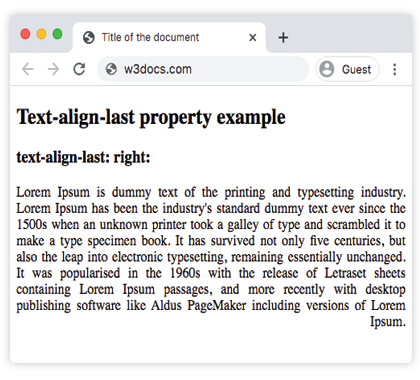
Exemple de la propriété text-align-last avec les valeurs « start », « justify » et « center » :
Exemple de toutes les valeurs CSS text-align-last
<!DOCTYPE html>
<html>
  <head>
    <title>Title of the document</title>
    <style>
      .demo1 {
        text-align: justify;
        text-align-last: start;
      }
      .demo2 {
        text-align: justify;
        text-align-last: center;
      }
      .demo3 {
        text-align: justify;
        text-align-last: justify;
      }
    </style>
  </head>
  <body>
    <h2>Text-align-last property example</h2>
    <h3>Text-align-last: start:</h3>
    <div class="demo1">
      Lorem Ipsum is dummy text of the printing and typesetting industry. Lorem Ipsum has been the industry's standard dummy text ever since the 1500s when an unknown printer took a galley of type and scrambled it to make a type specimen book. It has survived not only five centuries, but also the leap into electronic typesetting, remaining essentially unchanged. It was popularised in the 1960s with the release of Letraset sheets containing Lorem Ipsum passages, and more recently with desktop publishing software like Aldus PageMaker including versions of Lorem Ipsum.
    </div>
    <h3>Text-align-last: center:</h3>
    <div class="demo2">
      Lorem Ipsum is dummy text of the printing and typesetting industry. Lorem Ipsum has been the industry's standard dummy text ever since the 1500s when an unknown printer took a galley of type and scrambled it to make a type specimen book. It has survived not only five centuries, but also the leap into electronic typesetting, remaining essentially unchanged. It was popularised in the 1960s with the release of Letraset sheets containing Lorem Ipsum passages, and more recently with desktop publishing software like Aldus PageMaker including versions of Lorem Ipsum.
    </div>
    <h3>Text-align-last: justify:</h3>
    <div class="demo3">
      Lorem Ipsum is dummy text of the printing and typesetting industry. Lorem Ipsum has been the industry's standard dummy text ever since the 1500s when an unknown printer took a galley of type and scrambled it to make a type specimen book. It has survived not only five centuries, but also the leap into electronic typesetting, remaining essentially unchanged. It was popularised in the 1960s with the release of Letraset sheets containing Lorem Ipsum passages, and more recently with desktop publishing software like Aldus PageMaker including versions of Lorem Ipsum.
    </div>
  </body>
</html>Exemple de la propriété text-align-last avec la valeur « end » :
Exemple de la propriété text-align-last avec la valeur « end » :
<!DOCTYPE html>
<html>
  <head>
    <title>Title of the document</title>
    <style>
      .demo {
        text-align: justify;
        text-align-last: end;
      }
    </style>
  </head>
  <body>
    <h2>Text-align-last property example</h2>
    <h3>text-align-last: end:</h3>
    <div class="demo">
      <p>
        Lorem Ipsum is dummy text of the printing and typesetting industry. Lorem Ipsum has been the industry's standard dummy text ever since the 1500s when an unknown printer took a galley of type and scrambled it to make a type specimen book. It has survived not only five centuries, but also the leap into electronic typesetting, remaining essentially unchanged. It was popularised in the 1960s with the release of Letraset sheets containing Lorem Ipsum passages, and more recently with desktop publishing software like Aldus PageMaker including versions of Lorem Ipsum.
      </p>
      <p>
        Lorem Ipsum is dummy text of the printing and typesetting industry. Lorem Ipsum has been the industry's standard dummy text ever since the 1500s when an unknown printer took a galley of type and scrambled it to make a type specimen book. It has survived not only five centuries, but also the leap into electronic typesetting, remaining essentially unchanged.
      </p>
      <p>
        Lorem Ipsum is dummy text of the printing and typesetting industry. Lorem Ipsum has been the industry's standard dummy text ever since the 1500s when an unknown printer took a galley of type and scrambled it to make a type specimen book.
      </p>
    </div>
  </body>
</html>Valeurs
| Valeur | Description | Tester » |
|---|---|---|
| auto | Utilise la valeur de la propriété text-align. C'est la valeur par défaut. | Tester » |
| left | Aligne la dernière ligne à gauche. | Tester » |
| right | Aligne la dernière ligne à droite. | Tester » |
| center | Aligne la dernière ligne au centre. | Tester » |
| justify | La dernière ligne est justifiée comme les autres lignes. | Tester » |
| start | La dernière ligne est alignée au début de la ligne. Gauche si la direction est de gauche à droite et droite si la direction est de droite à gauche. | Tester » |
| end | La dernière ligne est alignée à la fin de la ligne. Droite si la direction est de gauche à droite, gauche si la direction est de droite à gauche. | Tester » |
| initial | Définit la valeur par défaut de la propriété. | Tester » |
| inherit | Hérite la propriété de son élément parent. | Tester » |
Pratique
Que fait la propriété 'text-align-last' en CSS ?