Propriété CSS overflow-x
La propriété overflow-x spécifie si le contenu doit être masqué, visible ou défilé horizontalement lorsque le contenu déborde des bords gauche et droit de l’élément. Cette propriété fait partie des propriétés CSS3.
La propriété overflow-x possède quatre valeurs principales : visible, scroll, auto et hidden.
INFO
Si la propriété overflow-y est hidden, scroll ou auto, et que overflow-x est visible par défaut, elle sera calculée à auto.
| Valeur initiale | visible |
|---|---|
| S’applique à | Conteneurs de bloc, conteneurs flex et conteneurs grid. |
| Héritée | Non. |
| Animable | Non. |
| Version | CSS3 |
| Syntaxe DOM | object.style.overflowX = "visible"; |
Syntaxe
CSS overflow-x
css
overflow-x: visible | hidden | scroll | auto | initial | inherit;Exemple de la propriété overflow-x :
Exemple de code CSS overflow-x
html
<!DOCTYPE html>
<html>
  <head>
    <title>Title of the document</title>
    <style>
      div.example {
        background-color: #1c87c9;
        color: #fff;
        width: 40px;
        overflow-x: scroll;
      }
    </style>
  </head>
  <body>
    <h2>Overflow-x property example</h2>
    <h3>Overflow-x: scroll</h3>
    <div class="example">
      Lorem Ipsum is simply dummy text of the printing and typesetting industry.
    </div>
  </body>
</html>Résultat
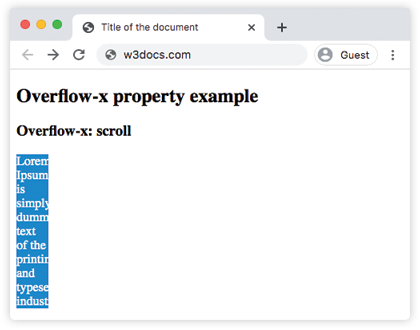
Exemple de la propriété overflow-x avec la valeur "visible" :
html
<!DOCTYPE html>
<html>
  <head>
    <title>Title of the document</title>
    <style>
      div.example {
        background-color: #1c87c9;
        color: #cccccc;
        width: 40px;
        overflow-x: visible;
      }
    </style>
  </head>
  <body>
    <h2>Overflow-x property example</h2>
    <h3>Overflow-x: visible</h3>
    <div class="example">
      Lorem Ipsum is simply dummy text of the printing and typesetting industry.
    </div>
  </body>
</html>Exemple de la propriété overflow-x avec la valeur "hidden" :
html
<!DOCTYPE html>
<html>
  <head>
    <title>Title of the document</title>
    <style>
      div.example {
        background-color: #1c87c9;
        color: #fff;
        width: 40px;
        overflow-x: hidden;
      }
    </style>
  </head>
  <body>
    <h2>Overflow-x property example</h2>
    <h3>Overflow-x: hidden</h3>
    <div class="example">
      Lorem Ipsum is simply dummy text of the printing and typesetting industry.
    </div>
  </body>
</html>Exemple de la propriété overflow-x avec la valeur "auto" :
html
<!DOCTYPE html>
<html>
  <head>
    <title>Title of the document</title>
    <style>
      div.example {
        background-color: #1c87c9;
        color: #fff;
        width: 40px;
        overflow-x: auto;
      }
    </style>
  </head>
  <body>
    <h2>Overflow-x property example</h2>
    <h3>Overflow-x: auto</h3>
    <div class="example">
      Lorem Ipsum is simply dummy text of the printing and typesetting industry.
    </div>
  </body>
</html>Exemple de la propriété overflow-x avec toutes les valeurs :
Exemple de toutes les valeurs de CSS overflow-x
html
<!DOCTYPE html>
<html>
  <head>
    <title>Title of the document</title>
    <style>
      div.scroll {
        background-color: #ccc;
        width: 50px;
        overflow-x: scroll;
      }
      div.hidden {
        background-color: #ccc;
        width: 50px;
        overflow-x: hidden;
      }
      div.auto {
        background-color: #ccc;
        width: 50px;
        overflow-x: auto;
      }
      div.visible {
        background-color: #ccc;
        width: 50px;
        overflow-x: visible;
      }
    </style>
  </head>
  <body>
    <h2>Overflow-x property example</h2>
    <h3>overflow-x: scroll</h3>
    <div class="scroll">
      Lorem Ipsum is simply dummy text of the printing and typesetting industry.
    </div>
    <h3>overflow-x: hidden</h3>
    <div class="hidden">
      Lorem Ipsum is simply dummy text of the printing and typesetting industry.
    </div>
    <h3>overflow-x: auto</h3>
    <div class="auto">
      Lorem Ipsum is simply dummy text of the printing and typesetting industry.
    </div>
    <h3>overflow-x: visible</h3>
    <div class="visible">
      Lorem Ipsum is simply dummy text of the printing and typesetting industry.
    </div>
  </body>
</html>Valeurs
| Value | Description | Play it |
|---|---|---|
| visible | Le contenu n’est pas rogné et s’affiche en dehors des bords gauche et droit de la boîte de remplissage. C’est la valeur par défaut de cette propriété. | Play it » |
| hidden | Le contenu est rogné pour tenir horizontalement dans la boîte de remplissage. Aucune barre de défilement n’est ajoutée. | Play it » |
| scroll | Le contenu est rogné pour tenir horizontalement dans la boîte de remplissage. La barre de défilement est ajoutée pour voir le reste du contenu. | Play it » |
| auto | Le contenu est rogné pour tenir horizontalement dans la boîte de remplissage. Une barre de défilement est ajoutée uniquement si le contenu déborde. | Play it » |
| initial | Fait utiliser à la propriété sa valeur par défaut. | Play it » |
| inherit | Hérite la propriété de son élément parent. |
Practice
Laquelle des propositions suivantes n’est pas une valeur de la propriété overflow-x ?