Propriété CSS border-top-color
La propriété border-top-color définit la couleur de la bordure supérieure d'un élément.
Vous pouvez spécifier la couleur de la bordure supérieure, ainsi que les couleurs des bordures inférieure, droite et gauche avec la propriété abrégée border-color.
Si vous utilisez la propriété border-top-color, vous devez d'abord définir les propriétés border-style ou border-top-style, puis modifier la couleur du style défini.
La largeur par défaut d'une bordure est medium. Vous pouvez spécifier la largeur à l'aide des propriétés border-width ou border-top-width.
| Valeur initiale | currentColor |
|---|---|
| S'applique à | Tous les éléments. S'applique également à ::first-letter. |
| Héritée | Non |
| Animable | Oui. La couleur de la bordure supérieure est animable. |
| Version | CSS1 |
| Syntaxe DOM | object.style.borderTopColor = "black"; |
Syntaxe
Syntaxe de la propriété CSS border-top-color
border-top-color: color | transparent | initial | inherit;Exemple de la propriété border-top-color :
Exemple de la propriété CSS border-top-color
<!DOCTYPE html>
<html>
  <head>
    <title>Title of the document</title>
    <style>
      div {
        width: 300px;
        padding: 20px;
        border-style: solid;
        border-color: #666;
        border-top-color: #1c87c9;
      }
    </style>
  </head>
  <body>
    <h2>Border-top-color example</h2>
    <div>Example for the border-top-color property with different top border color.</div>
  </body>
</html>Résultat
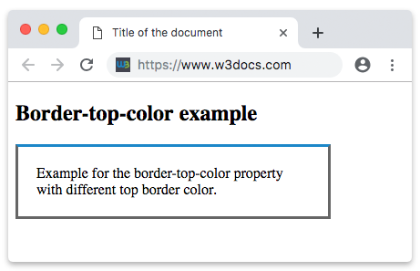
Exemple de la propriété border-top-color avec la valeur « transparent » :
Exemple de la propriété CSS border-top-color avec la valeur transparent
<!DOCTYPE html>
<html>
  <head>
    <title>Title of the document</title>
    <style>
      h2 {
        padding-bottom: 8px;
        text-align: center;
        border: 12px groove #1c87c9;
        border-top-color: transparent;
      }
    </style>
  </head>
  <body>
    <h2>A heading with a transparent top border</h2>
  </body>
</html>INFO
Les valeurs hexadécimales, RGB, RGBA, HSL, HSLA ou les noms de couleurs peuvent être appliqués comme valeur pour la propriété border-top-color.
Exemple de la propriété border-top-color avec une valeur de couleur nommée :
Exemple de la propriété CSS border-top-color avec la valeur darkred (nom de couleur)
<!DOCTYPE html>
<html>
  <head>
    <title>Title of the document</title>
    <style>
      div {
        padding: 10px;
        width: 50%;
        border: solid #666;
        border-top-color: darkred;
      }
    </style>
  </head>
  <body>
    <div>Border-top-color property with a named color value.</div>
  </body>
</html>Exemple de la propriété border-top-color avec une valeur hexadécimale :
Exemple de la propriété CSS border-top-color avec une valeur hexadécimale
<!DOCTYPE html>
<html>
  <head>
    <title>Title of the document</title>
    <style>
      div {
        padding: 10px;
        width: 50%;
        border: solid #666;
        border-top-color: #1c87c9;
      }
    </style>
  </head>
  <body>
    <div>Border-top-color property with a hexadecimal value.</div>
  </body>
</html>Exemple de la propriété border-top-color avec une valeur RGB :
Exemple de la propriété CSS border-top-color avec une valeur RGB
<!DOCTYPE html>
<html>
  <head>
    <title>Title of the document</title>
    <style>
      div {
        padding: 10px;
        width: 50%;
        border: solid #666;
        border-top-color: rgb(142, 191, 66);
      }
    </style>
  </head>
  <body>
    <div>Border-top-color property with a RGB value.</div>
  </body>
</html>Exemple de la propriété border-top-color avec une valeur HSL :
Exemple de la propriété CSS border-top-color avec une valeur HSL
<!DOCTYPE html>
<html>
  <head>
    <title>Title of the document</title>
    <style>
      div {
        padding: 10px;
        width: 50%;
        border: solid #666;
        border-top-color: hsl(24, 80%, 50%);
      }
    </style>
  </head>
  <body>
    <div>Border-top-color property with a HSL value.</div>
  </body>
</html>Valeurs
| Valeur | Description | Essayer |
|---|---|---|
| color | Définit la couleur de la bordure supérieure. La couleur par défaut est celle de l'élément actuel. Les noms de couleurs, les codes hexadécimaux, rgb(), rgba(), hsl(), hsla() peuvent être utilisés. Valeur requise. | Essayer » |
| transparent | Applique une couleur transparente à la bordure supérieure. La bordure supérieure occupera toujours l'espace défini par la valeur border-width. | Essayer » |
| initial | Définit la propriété à sa valeur par défaut. | Essayer » |
| inherit | Hérite la propriété de son élément parent. |
Pratique
À quoi sert la propriété 'border-top-color' en CSS ?