Propriété float CSS
La propriété float définit de quel côté du conteneur les éléments doivent être placés, permettant ainsi au texte ou à d'autres éléments de s'enrouler autour. La propriété possède trois valeurs : none, left et right.
Cette propriété est directement liée à la clear qui définit si un élément doit se trouver à côté d'éléments flottants ou en dessous d'eux (clear).
INFO
La propriété float sera ignorée si les éléments sont positionnés de manière absolue (position: absolute).
| Valeur initiale | none |
|---|---|
| S'applique à | Tous les éléments. |
| Héritée | Non. |
| Animable | Non. |
| Version | CSS1 |
| Syntaxe DOM | object.style.cssFloat = "right"; |
Syntaxe
Syntaxe de la propriété CSS float
css
float: none | left | right | initial | inherit;Exemple de la propriété float :
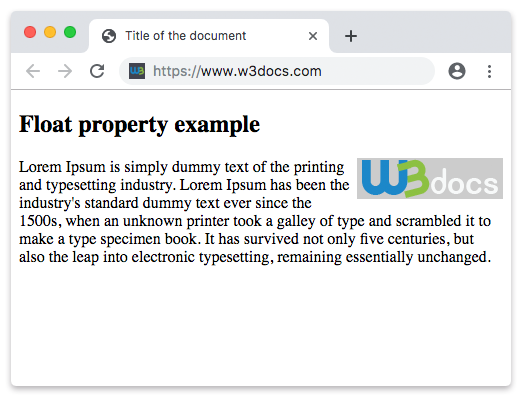
Exemple de la propriété CSS float avec la valeur right
html
<!DOCTYPE html>
<html>
  <head>
    <title>Title of the document</title>
    <style>
      img {
        float: right;
        background: #ccc;
      }
    </style>
  </head>
  <body>
    <h2>Float property example</h2>
    <img src="https://fr.w3docs.com/uploads/media/default/0001/01/003e5c463668d174ab70bea245c192d81901a4a6.png" alt="W3dcos" />
    <p>
      Lorem Ipsum is simply dummy text of the printing and typesetting industry. Lorem Ipsum has been the industry's standard dummy text ever since the 1500s, when an unknown printer took a galley of type and scrambled it to make a type specimen book. It has survived not only five centuries, but also the leap into electronic typesetting, remaining essentially unchanged.
    </p>
  </body>
</html>Résultat
Dans l'exemple suivant, l'image flotte vers la gauche.
Exemple d'utilisation de la propriété float pour faire flotter une image :
Exemple de la propriété CSS float avec la valeur left
html
<!DOCTYPE html>
<html>
  <head>
    <title>Title of the document</title>
    <style>
      img {
        float: left;
        background: #ccc;
      }
    </style>
  </head>
  <body>
    <h2>Float property example</h2>
    <img src="https://fr.w3docs.com/uploads/media/default/0001/01/003e5c463668d174ab70bea245c192d81901a4a6.png" alt="W3dcos" />
    <p>
      Lorem Ipsum is simply dummy text of the printing and typesetting industry. Lorem Ipsum has been the industry's standard dummy text ever since the 1500s, when an unknown printer took a galley of type and scrambled it to make a type specimen book. It has survived not only five centuries, but also the leap into electronic typesetting, remaining essentially unchanged.
    </p>
  </body>
</html>Valeurs
| Valeur | Description | Tester |
|---|---|---|
| none | Indique que l'élément n'est pas flotté et sera affiché à l'endroit où il se trouve dans le texte. Il s'agit de la valeur par défaut de cette propriété. | Tester » |
| left | Indique que l'élément flotte vers la gauche. | Tester » |
| right | Indique que l'élément flotte vers la droite. | Tester » |
| initial | Fait utiliser à la propriété sa valeur par défaut. | Tester » |
| inherit | Hérite la propriété de son élément parent. |
Pratique
Quelle est l'utilité de la propriété 'float' en CSS ?