Propriété CSS word-break
La propriété word-break spécifie où les lignes doivent être coupées.
Normalement, les sauts de ligne ne se produisent qu'aux espaces ou aux tirets. Mais lorsque la propriété word-break est définie sur la valeur break-all, le navigateur coupera les lignes à n'importe quel endroit.
Cette propriété fait partie des propriétés CSS3.
| Valeur initiale | normal |
|---|---|
| S'applique à | Tous les éléments. |
| Héritée | Oui. |
| Animable | Non. |
| Version | CSS3 |
| Syntaxe DOM | object.style.wordBreak = "break-all"; |
Syntaxe
Valeurs CSS word-break
css
word-break: normal | break-all | keep-all | break-word | initial | inherit;Exemple de la propriété word-break :
Exemple de code CSS word-break
html
<!DOCTYPE html>
<html>
  <head>
    <title>The title of the document</title>
    <style>
      html,
      body {
        height: 100%;
      }
      body {
        font-family: Helvetica, sans-serif;
        display: flex;
        justify-content: center;
        align-items: center;
        background-color: #8ebf42;
      }
      p {
        word-break: break-all;
        line-height: 1;
        text-transform: uppercase;
        text-align: center;
        font-size: 30px;
        font-weight: bold;
        color: #eee;
        width: 1em;
      }
    </style>
  </head>
  <body>
    <p>element</p>
  </body>
</html>Résultat
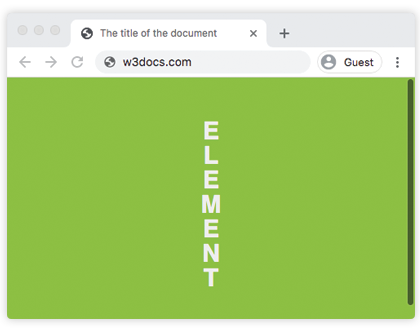
Dans l'exemple suivant, les mots sont coupés dans le texte.
Exemple de la propriété word-break avec la valeur "break-all" :
Exemple de code CSS word-break break-all
html
<!DOCTYPE html>
<html>
  <head>
    <title>The title of the document</title>
    <style>
      body {
        font-size: 0.95em;
        line-height: 1.5;
        font-family: 'Helvetica Neue', Helvetica, Arial, sans-serif;
      }
      .container {
        margin: 50px auto;
        max-width: 700px;
      }
      .text {
        padding: 20px;
        background-color: #666;
        color: white;
        text-align: justify;
      }
      .break {
        word-break: break-all;
      }
      strong {
        background-color: #000;
      }
    </style>
  </head>
  <body>
    <h2>Word-break property example</h2>
    <div class="container">
      <h3>Text breaks inside words</h3>
      <p class="text break">
        Lorem Ipsum is simply dummy text of the printing and typesetting industry. Lorem <strong>Ipsum</strong> has been the industry's standard dummy text ever since the 1500s, when an <strong>unknown</strong> printer took a galley of type and scrambled it to make a type specimen book. It has survived not only five centuries, but also the leap into electronic typesetting, <strong>remaining</strong> essentially unchanged.
      </p>
    </div>
  </body>
</html>Valeurs
| Valeur | Description |
|---|---|
| normal | Utilise les règles de saut de ligne. Il s'agit de la valeur par défaut de cette propriété. |
| break-all | Coupe entre n'importe quels deux caractères, indépendamment du dépassement. Cela peut rendre le texte difficile à lire. |
| keep-all | Les sauts de mots ne doivent pas être utilisés pour le texte chinois/japonais/coréen (CJK). Le comportement du texte non-CJK est le même que pour normal. |
| break-word | Déprécié. Coupe les mots à des points arbitraires s'il n'y a pas de points de rupture acceptables sur la ligne. Utilisez overflow-wrap: anywhere à la place. |
| initial | Définit la propriété sur sa valeur par défaut. |
| inherit | Hérite la propriété de son élément parent. |
Pratique
Quelle affirmation est correcte concernant la propriété word-break ?