Propriété CSS position
La propriété position spécifie la position de l’élément dans un document.
Cette propriété a les valeurs suivantes :
- static
- fixed
- absolute
- relative
- sticky
Types de positionnement
Éléments positionnés - lorsqu’un élément est positionné, sa position sur la page est déterminée à l’aide des propriétés de décalage : top, right, bottom et left. Les propriétés de décalage ne fonctionnent pas sur les éléments statiques.
Éléments positionnés relativement - la valeur de position est "relative". Les propriétés top et bottom spécifient le décalage vertical par rapport à sa position normale, les propriétés left et right spécifient le décalage horizontal.
Éléments positionnés absolument - la valeur de position est "absolute" ou "fixed". Les propriétés top, right, bottom et left spécifient les décalages par rapport aux bords du bloc conteneur de l’élément.
Éléments positionnés en mode collant - la valeur de position est "sticky". Elle est traitée comme un mélange d’éléments "relative" et "fixed".
| Valeur initiale | static |
|---|---|
| S’applique à | Tous les éléments. |
| Hérité | Non. |
| Animable | Non. |
| Version | CSS2 |
| Syntaxe DOM | Object.style.position = "sticky"; |
Syntaxe
Syntaxe CSS de position
position: static | absolute | fixed | relative | sticky | initial | inherit;Exemple de la propriété position :
Exemple de code CSS de position
<!DOCTYPE html>
<html>
  <head>
    <title>Title of the document</title>
    <style>
      p {
        position: absolute;
        left: 40px;
        top: 120px;
      }
    </style>
  </head>
  <body>
    <h2>Position property example</h2>
    <p>Lorem Ipsum is dummy text of the printing and typesetting industry. Lorem Ipsum has been the industry's standard dummy text ever since the 1500s when an unknown printer took a galley of type and scrambled it to make a type specimen book.</p>
  </body>
</html>Résultat
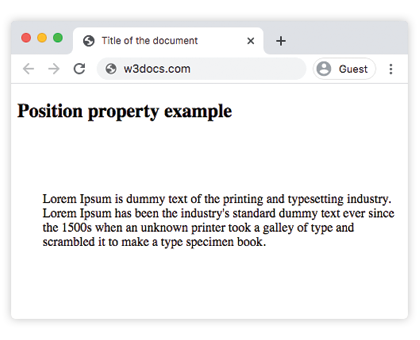
Exemple de la propriété position avec toutes les valeurs :
Exemple de toutes les valeurs de position CSS
<!DOCTYPE html>
<html>
  <head>
    <title>Title of the document</title>
    <style>
      #box1 {
        position: static;
        border: 2px solid #666;
        width: 300px;
        height: 100px;
      }
      #box2 {
        position: absolute;
        border: 2px solid #8ebf42;
        top: 70px;
        right: 15px;
      }
      #box3 {
        position: relative;
        border: 2px solid #666;
        width: 300px;
        height: 100px;
      }
      #box4 {
        position: absolute;
        border: 2px solid #8ebf42;
        top: 70px;
        right: 15px;
      }
      #box5 {
        position: absolute;
        border: 2px solid #666;
        width: 320px;
        height: 100px;
        top: 750px;
        right: 25px;
      }
      #box6 {
        position: absolute;
        border: 2px solid #8ebf42;
        top: 70px;
        right: 15px;
      }
      #box7 {
        position: fixed;
        border: 2px solid #8ebf42;
        background-color: #eee;
        width: 300px;
        height: 100px;
        bottom: 0;
        left: 0;
        right: 0;
      }
      #box8 {
        position: absolute;
        border: 2px solid #666;
        top: 70px;
        right: 15px;
      }
    </style>
  </head>
  <body>
    <h2>Position property example</h2>
    <h3>Position: static</h3>
    <p>
      The Box1 element remains in the natural flow of the page and does not act as anchor point for the absolutely positioned Box2 element:
    </p>
    <div id="box1">
      Box1: position: static.
      <div id="box2">Box2: position: absolute, right: 15px, top: 70px</div>
    </div>
    <h3>Position: relative</h3>
    <p>
      The Box3 element remains in the natural flow of the page and also acts as anchor point for the absolutely positioned Box4 element:
    </p>
    <div id="box3">
      Box3: position: relative.
      <div id="box4">Box4: position: absolute, right: 15px, top: 70px</div>
    </div>
    <h3>Position: absolute</h3>
    <p>
      The Box5 element does not remain in the natural flow of the page. It positions itself according to the closest positioned ancestor and also acts as anchor point for the absolutely positioned Box6 element:
    </p>
    <div id="box5">
      Box5: position: absolute, top: 750px, right: 15px.
      <div id="box6">Box6: position: absolute, right: 15px, top: 70px</div>
    </div>
    <h3>Position: fixed</h3>
    <p>
      The Box7 element does not remain in the natural flow of the page and positions itself according to the viewport and acts as anchor point for the absolutely positioned Box8 element:
    </p>
    <div id="box7">
      Box7: position: fixed, bottom: 0, left: 0, right: 0.
      <div id="box8">Box8: position: absolute, right: 15px, top: 70px</div>
    </div>
  </body>
</html>Dans l’exemple donné, nous incluons toutes les valeurs pour montrer les différences :
Exemple de la propriété position avec la valeur "sticky" :
Exemple de la propriété position avec la valeur "sticky" :
<!DOCTYPE html>
<html>
  <head>
    <title>Title of the document</title>
    <style>
      ul {
        height: 150px;
        overflow: auto;
        position: relative;
        background-color: #cccccc;
        padding: 0;
      }
      ul li {
        list-style-type: none;
        height: 30px;
        padding: 10px 10px 0;
      }
      ul li:first-child {
        position: -webkit-sticky;
        position: sticky;
        top: 1px;
        background-color: #dddddd;
      }
    </style>
  </head>
  <body>
    <h2>Example of the position property with the "sticky" value:</h2>
    <ul>
      <li>Sticky List Item</li>
      <li>List Item 1</li>
      <li>List Item 2</li>
      <li>List Item 3</li>
      <li>List Item 4</li>
      <li>List Item 5</li>
      <li>List Item 6</li>
      <li>List Item 7</li>
      <li>List Item 8</li>
      <li>List Item 9</li>
    </ul>
  </body>
</html>Valeurs
| Value | Description | Play it |
|---|---|---|
| static | Elements are placed according to the normal flow of the document. This is the default value of this property. | Play it » |
| absolute | Elements are removed from the document flow and are positioned relative to its positioned ancestor element. | Play it » |
| fixed | Elements are removed from the document flow and are positioned relative to the browser window. | Play it » |
| relative | Element are placed relative to its normal position. | Play it » |
| sticky | Elements are positioned according to the normal flow of the document, and then offset relative to its nearest scrolling ancestor and containing block. | |
| initial | Makes the property use its default value. | Play it » |
| inherit | Inherits the property from its parents element. |
Practice
What are the different types of positioning in CSS?