Propriété CSS flex-wrap
La propriété flex-wrap définit si les éléments flexibles doivent ou non se replier (wrap). En d'autres termes, elle définit si les éléments sont forcés sur une seule ligne ou s'ils peuvent s'écouler sur plusieurs lignes.
S'il n'y a pas d'éléments flexibles, la propriété flex-wrap n'aura aucun effet.
La propriété flex-wrap fait partie des propriétés CSS3.
| Valeur initiale | nowrap |
|---|---|
| S'applique à | Conteneurs flex. |
| Héritée | Non. |
| Animable | Non. |
| Version | CSS3 |
| Syntaxe DOM | object.style.flexWrap = "wrap-reverse"; |
Syntaxe
Syntaxe de la propriété CSS flex-wrap
css
flex-wrap: nowrap | wrap | wrap-reverse | initial | inherit;Exemple de la propriété flex-wrap avec la valeur "wrap" :
Exemple de la propriété CSS flex-wrap avec la valeur wrap
html
<!DOCTYPE html>
<html>
  <head>
    <title>Title of the document</title>
    <style>
      .wrap {
        width: 200px;
        height: 200px;
        border: 1px solid #cccccc;
        display: flex;
        flex-wrap: wrap;
      }
      .wrap div {
        width: 50px;
        height: 50px;
      }
    </style>
  </head>
  <body>
    <h2>The flex-wrap Property</h2>
    <div class="wrap">
      <div style="background-color:coral;">A</div>
      <div style="background-color:lightblue;">B</div>
      <div style="background-color:khaki;">C</div>
      <div style="background-color:pink;">D</div>
      <div style="background-color:lightgrey;">E</div>
      <div style="background-color:lightgreen;">F</div>
    </div>
  </body>
</html>Exemple de la propriété flex-wrap avec la valeur "nowrap" :
Exemple de la propriété CSS flex-wrap avec la valeur nowrap
html
<!DOCTYPE html>
<html>
  <head>
    <title>Title of the document</title>
    <style>
      .example {
        width: 200px;
        height: 200px;
        border: 1px solid #c3c3c3;
        display: flex;
        flex-wrap: nowrap;
      }
      .example div {
        width: 50px;
        height: 50px;
      }
    </style>
  </head>
  <body>
    <h2>Flex-wrap property example</h2>
    <div class="example">
      <div style="background-color: #8ebf42;">A</div>
      <div style="background-color: #1c87c9;">B</div>
      <div style="background-color: #cccccc;">C</div>
      <div style="background-color: #666666;">D</div>
      <div style="background-color: #4c4a4a;">E</div>
      <div style="background-color: #c6c4c4;">F</div>
    </div>
  </body>
</html>Résultat
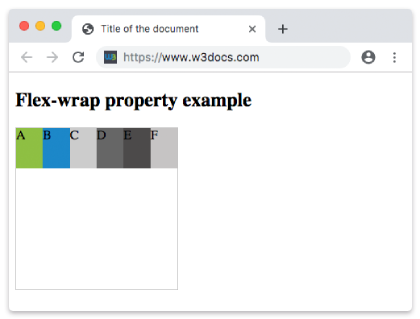
Exemple de la propriété flex-wrap avec la valeur "wrap-reverse" :
Exemple de la propriété CSS flex-wrap avec la valeur wrap-reverse
html
<!DOCTYPE html>
<html>
  <head>
    <title>Title of the document</title>
    <style>
      .example {
        width: 200px;
        height: 200px;
        border: 1px solid #c3c3c3;
        display: flex;
        flex-wrap: wrap-reverse;
      }
      .example div {
        width: 50px;
        height: 50px;
      }
    </style>
  </head>
  <body>
    <h2>Flex-wrap property example</h2>
    <div class="example">
      <div style="background-color: #8ebf42;">A</div>
      <div style="background-color: #1c87c9;">B</div>
      <div style="background-color: #cccccc;">C</div>
      <div style="background-color: #666666;">D</div>
      <div style="background-color: #4c4a4a;">E</div>
      <div style="background-color: #c6c4c4;">F</div>
    </div>
  </body>
</html>Valeurs
| Valeur | Description | Tester » |
|---|---|---|
| nowrap | Définit que les éléments flexibles ne se replieront pas. C'est la valeur par défaut de cette propriété. | Tester » |
| wrap | Définit que les éléments flexibles se replieront si nécessaire. | Tester » |
| wrap-reverse | Définit que les éléments flexibles se replieront dans l'ordre inverse si nécessaire. | Tester » |
| initial | Fait utiliser à la propriété sa valeur par défaut. | Tester » |
| inherit | Hérite la propriété de son élément parent. |
Pratique
Quel est l'objectif de la propriété 'flex-wrap' en CSS ?