Propriété opacity du CSS
La propriété opacity est utilisée pour définir le niveau de transparence d'un élément.
Cette propriété fait partie des propriétés CSS3.
Cette propriété permet de rendre un élément entièrement transparent, semi-transparent ou par défaut.
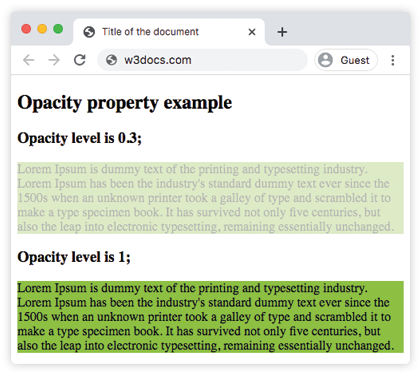
La valeur est comprise entre 0 et 1. 0 rend l'élément entièrement transparent. 1 est la valeur par défaut qui rend l'élément entièrement opaque. Une valeur comprise entre 0 et 1 le rend progressivement transparent.
INFO
Les valeurs négatives sont invalides.
TIP
Lorsque vous ajoutez de la transparence à l'arrière-plan d'un élément à l'aide de la propriété opacity, tous ses éléments enfants deviennent également transparents. Utilisez les couleurs RGBA si vous ne souhaitez pas appliquer l'opacité aux éléments enfants.
| Valeur initiale | 1.0 |
|---|---|
| S'applique à | Tous les éléments. |
| Héritée | Non. |
| Animable | Oui. |
| Version | CSS3 |
| Syntaxe DOM | object.style.opacity = "0.3"; |
Syntaxe
Syntaxe CSS de opacity
opacity: number | initial | inherit;Exemple de la propriété opacity :
Exemple de code CSS pour opacity
<!DOCTYPE html>
<html>
  <head>
    <title>Title of the document</title>
    <style>
      .example1 {
        background-color: #8ebf42;
        opacity: 0.3;
      }
      .example2 {
        background-color: #8ebf42;
        opacity: 1;
      }
    </style>
  </head>
  <body>
    <h2>Opacity property example</h2>
    <h3>Opacity level is 0.3;</h3>
    <div class="example1"> Lorem Ipsum is dummy text of the printing and typesetting industry. Lorem Ipsum has been the industry's standard dummy text ever since the 1500s when an unknown printer took a galley of type and scrambled it to make a type specimen book. It has survived not only five centuries, but also the leap into electronic typesetting, remaining essentially unchanged. </div>
    <h3>Opacity level is 1;</h3>
    <div class="example2">Lorem Ipsum is dummy text of the printing and typesetting industry. Lorem Ipsum has been the industry's standard dummy text ever since the 1500s when an unknown printer took a galley of type and scrambled it to make a type specimen book. It has survived not only five centuries, but also the leap into electronic typesetting, remaining essentially unchanged.</div>
  </body>
</html>Résultat
Un autre exemple où le niveau d'opacité de la première image est de 1,0, celui de la deuxième image est de 0,6 et le niveau d'opacité de la troisième image est de 0,2.
Exemple de la propriété opacity avec trois niveaux d'opacité :
Autre exemple de code CSS pour opacity
<!DOCTYPE html>
<html>
  <head>
    <title>Title of the document</title>
    <style>
      img.a {
        opacity: 1;
      }
      img.b {
        opacity: 0.6;
      }
      img.c {
        opacity: 0.2;
      }
    </style>
  </head>
  <body>
    <h2>Opacity property example</h2>
    <h3>Opacity: 1.0;</h3>
    <img src="https://fr.w3docs.com/uploads/media/default/0001/01/4982c4f43023330a662b9baed5a407e391ae6161.jpeg" alt="house" width="300" height="300" class="a" />
    <h3>Opacity: 0.6;</h3>
    <img src="https://fr.w3docs.com/uploads/media/default/0001/01/4982c4f43023330a662b9baed5a407e391ae6161.jpeg" alt="house" width="300" height="300" class="b" />
    <h3>Opacity: 0.2;</h3>
    <img src="https://fr.w3docs.com/uploads/media/default/0001/01/4982c4f43023330a662b9baed5a407e391ae6161.jpeg" alt="house" width="300" height="300" class="c" />
  </body>
</html>Valeurs
| Valeur | Description | Tester » |
|---|---|---|
| number | Définit le niveau d'opacité. La valeur par défaut est 1,0. | Tester » |
| initial | Fait utiliser à la propriété sa valeur par défaut. | Tester » |
| inherit | Hérite la propriété de son élément parent. |
Pratique
What is the 'opacity' property in CSS and how is it used?