Propriété CSS background-repeat
La propriété background-repeat est utilisée pour définir comment l’image d’arrière-plan doit être répétée. Par défaut, l’image d’arrière-plan se répète à la fois horizontalement et verticalement. Si la valeur "repeat-x" est définie, l’image sera répétée uniquement horizontalement. Si la valeur "repeat-y" est définie, l’image sera répétée uniquement verticalement. Il existe deux autres valeurs : "space" et "round". "Space" permet de répéter l’image sans la rogner et "round" permet de répéter l’image sans espaces.
Nous devons utiliser la propriété background-repeat avec les propriétés background-image et background-position.
INFO
Par défaut, l’image sera affichée dans le coin supérieur gauche sans la propriété background-position.
| Initial Value | repeat |
|---|---|
| Applies to | All elements. It also applies to ::first-letter and ::first-line. |
| Inherited | No. |
| Animatable | No. |
| Version | CSS1 |
| DOM Syntax | element.style.backgroundRepeat = "repeat-x"; |
Syntaxe
Syntaxe de la propriété CSS background-repeat
background-repeat: repeat | repeat-x | repeat-y | no-repeat | space | round | initial | inherit;Exemple de la propriété background-repeat :
Exemple de la propriété CSS background-repeat avec la valeur repeat
<!DOCTYPE html>
<html>
  <head>
    <title>Title of the document</title>
    <style>
      body {
        background-image: url("https://fr.w3docs.com/uploads/media/default/0001/02/668fdd72934232cdeff7a45a89be805113c916b5.jpeg");
        background-repeat: repeat;
      }
    </style>
  </head>
  <body>
    <h2>This is some heading for an example.</h2>
    <p>Some paragraph for an example.</p>
  </body>
</html>Résultat
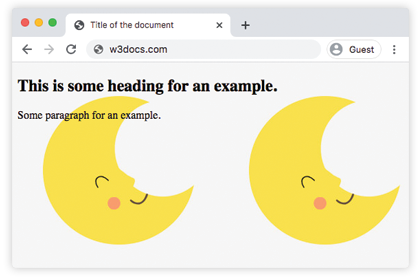
Dans l’exemple suivant, l’image d’arrière-plan n’est pas répétée.
Exemple de la propriété background-repeat avec la valeur "no-repeat" :
Exemple de la propriété CSS background-repeat avec la valeur no-repeat
<!DOCTYPE html>
<html>
  <head>
    <title>Title of the document</title>
    <style>
      body {
        background-image: url("https://fr.w3docs.com/uploads/media/default/0001/02/668fdd72934232cdeff7a45a89be805113c916b5.jpeg");
        background-repeat: no-repeat;
      }
    </style>
  </head>
  <body>
    <h2>This is some heading for an example.</h2>
    <p>Some paragraph for an example.</p>
  </body>
</html>Dans l’exemple suivant, l’image d’arrière-plan est répétée uniquement horizontalement.
Exemple de la propriété background-repeat avec la valeur "repeat-x" :
Exemple de la propriété CSS background-repeat avec la valeur repeat-x
<!DOCTYPE html>
<html>
  <head>
    <title>Title of the document</title>
    <style>
      body {
        background-image: url("https://fr.w3docs.com/uploads/media/default/0001/02/668fdd72934232cdeff7a45a89be805113c916b5.jpeg");
        background-repeat: repeat-x;
      }
    </style>
  </head>
  <body>
    <h2>This is some heading for an example.</h2>
    <p>Some paragraph for an example.</p>
  </body>
</html>Ici, la valeur "repeat-y" fait que l’image est répétée uniquement verticalement.
Exemple de la propriété background-repeat avec la valeur "repeat-y" :
Exemple de la propriété CSS background-repeat avec la valeur repeat-y
<!DOCTYPE html>
<html>
  <head>
    <title>Title of the document</title>
    <style>
      body {
        background-image: url("https://fr.w3docs.com/uploads/media/default/0001/02/668fdd72934232cdeff7a45a89be805113c916b5.jpeg");
        background-repeat: repeat-y;
      }
    </style>
  </head>
  <body>
    <h2>This is some heading for an example.</h2>
    <p>Some paragraph for an example.</p>
  </body>
</html>Essayons un exemple où l’image d’arrière-plan est répétée sans être rognée.
Exemple de la propriété background-repeat avec la valeur "space" :
Exemple de la propriété CSS background-repeat avec la valeur space
<!DOCTYPE html>
<html>
  <head>
    <title>Title of the document</title>
    <style>
      body {
        background-image: url("https://fr.w3docs.com/uploads/media/default/0001/02/668fdd72934232cdeff7a45a89be805113c916b5.jpeg");
        background-repeat: space;
      }
    </style>
  </head>
  <body>
    <h2>This is some heading for an example.</h2>
    <p>Some paragraph for an example.</p>
  </body>
</html>Dans l’exemple suivant, la valeur appliquée fait que l’image d’arrière-plan est répétée sans espaces.
Exemple de la propriété background-repeat avec la valeur "round" :
Exemple de la propriété CSS background-repeat avec la valeur round
<!DOCTYPE html>
<html>
  <head>
    <title>Title of the document</title>
    <style>
      body {
        background-image: url("https://fr.w3docs.com/uploads/media/default/0001/02/668fdd72934232cdeff7a45a89be805113c916b5.jpeg");
        background-repeat: round;
      }
    </style>
  </head>
  <body>
    <h2>This is some heading for an example.</h2>
    <p>Some paragraph for an example.</p>
  </body>
</html>Valeurs
| Value | Description | Play it |
|---|---|---|
| repeat | The background image is repeated both horizontally and vertically. This is the default value. | Play it » |
| repeat-x | The background image is repeated only horizontally. | Play it » |
| repeat-y | The background image is repeated only vertically. | Play it » |
| no-repeat | The background image is not repeated. | Play it » |
| space | The background image is repeated as much as possible without clipping. | Play it » |
| round | The background image is repeated without gaps. | Play it » |
| initial | Sets the property to its default value. | Play it » |
| inherit | Inherits the property from its parent element. |
Practice
What are the different values that can be specified for the 'background-repeat' property in CSS?