Propriété CSS text-justify
La propriété text-justify définit le comportement de l'espacement entre les mots ou les caractères.
La propriété text-justify est l'une des propriétés CSS3.
La propriété text-justify sélectionne la méthode de justification du texte lorsque text-align est défini sur "justify".
| Valeur initiale | auto |
|---|---|
| S'applique à | Éléments de niveau bloc. |
| Héritée | Non. |
| Animable | Non. |
| Version | CSS3 |
| Syntaxe DOM | object.style.textJustify = "inter-character"; |
Syntaxe
Valeurs CSS text-justify
text-justify: auto | inter-word | inter-character | none | initial | inherit;Exemple de la propriété text-justify :
Exemple de code CSS text-justify
<!DOCTYPE html>
<html>
  <head>
    <title>Title of the document</title>
    <style>
      div {
        text-align: justify;
        text-justify: inter-word;
      }
    </style>
  </head>
  <body>
    <h2>Text-justify property example</h2>
    <div>
      Lorem Ipsum is simply dummy text of the printing and typesetting industry. Lorem Ipsum has been the industry's standard dummy text ever since the 1500s when an unknown printer took a galley of type and scrambled it to make a type specimen book. It has survived not only five centuries, but also the leap into electronic typesetting, remaining essentially unchanged. It was popularised in the 1960s with the release of Letraset sheets containing Lorem Ipsum passages, and more recently with desktop publishing software like Aldus PageMaker including versions of Lorem Ipsum.
    </div>
  </body>
</html>Résultat
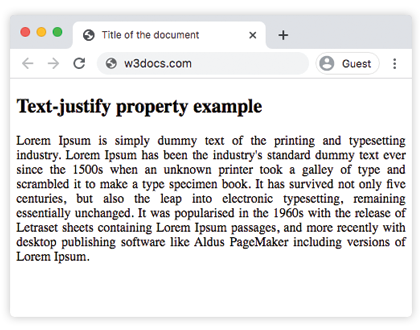
Dans l'exemple suivant, redimensionnez le navigateur pour voir comment fonctionne "justify" :
Exemple de la propriété text-justify avec la valeur "inter-character" :
Exemple de CSS text-justify avec la valeur inter-character
<!DOCTYPE html>
<html>
  <head>
    <title>Title of the document</title>
    <style>
      div {
        text-align: justify;
        text-justify: inter-character;
      }
    </style>
  </head>
  <body>
    <h2>Text-justify property example</h2>
    <div>
      Lorem Ipsum is simply dummy text of the printing and typesetting industry. Lorem Ipsum has been the industry's standard dummy text ever since the 1500s when an unknown printer took a galley of type and scrambled it to make a type specimen book. It has survived not only five centuries, but also the leap into electronic typesetting, remaining essentially unchanged. It was popularised in the 1960s with the release of Letraset sheets containing Lorem Ipsum passages, and more recently with desktop publishing software like Aldus PageMaker including versions of Lorem Ipsum.
    </div>
  </body>
</html>Remarque : La prise en charge de
text-justifypar les navigateurs est limitée. La valeurinter-charactern'est pas prise en charge par la plupart des navigateurs modernes.
Valeurs
| Valeur | Description | Tester » |
|---|---|---|
auto | L'algorithme de justification est défini. Le navigateur est autorisé à déterminer si inter-word ou inter-character est meilleur pour la justification. Il s'agit de la valeur par défaut de cette propriété. | Tester » |
inter-word | Le navigateur augmente l'espace entre les mots. C'est typique pour les langues avec des limites de mots claires. | Tester » |
inter-character | Le navigateur augmente l'espace entre les caractères lors de la justification. | Tester » |
none | La justification est désactivée. | Tester » |
initial | Fait utiliser à la propriété sa valeur par défaut. | Tester » |
inherit | Hérite la propriété de son élément parent. |
Pratique
Quelles sont les différentes valeurs de la propriété 'text-justify' en CSS, et que signifient-elles ?