Propriété writing-mode CSS
La propriété CSS writing-mode spécifie si le texte doit être disposé verticalement ou horizontalement.
Cette propriété modifie la direction du flux de texte afin que le contenu puisse être lu horizontalement (de gauche à droite ou de droite à gauche) ou verticalement (de haut en bas), selon la valeur. Par exemple, elle est couramment utilisée pour prendre en charge les scripts traditionnels verticaux d'Asie de l'Est ou les mises en page horizontales modernes. Remarque : Lorsque vous utilisez des valeurs verticales, vous avez généralement besoin de la propriété text-orientation pour contrôler la rotation des caractères individuels.
La propriété writing-mode affecte la direction du flux de blocs, qui est la direction dans laquelle les conteneurs de niveau bloc sont empilés, et la direction dans laquelle le contenu de niveau en ligne s'écoule à l'intérieur d'un conteneur de bloc.
INFO
Les navigateurs modernes prennent entièrement en charge la propriété writing-mode sans préfixes fournisseurs.
| Valeur initiale | horizontal-tb |
|---|---|
| S'applique à | Tous les éléments à l'exception des groupes de lignes de tableau, groupes de colonnes de tableau, lignes de tableau, colonnes de tableau, conteneurs de base ruby et conteneurs d'annotation ruby. |
| Héritée | Oui. |
| Animable | Non. |
| Version | CSS3 |
| Syntaxe DOM | object.style.writingMode = "vertical-lr"; |
Syntaxe
Valeurs CSS writing-mode
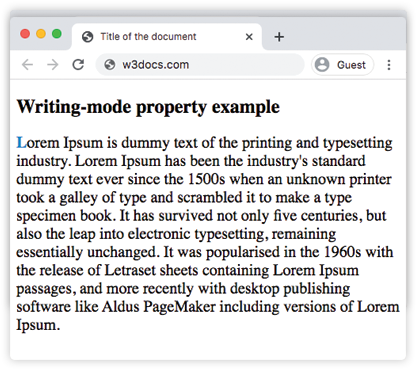
writing-mode: horizontal-tb | vertical-tb | vertical-rl | vertical-lr | sideways-rl | sideways-lr;Exemple de la propriété writing-mode avec la valeur horizontal-tb :
Exemple de code CSS writing-mode
<!DOCTYPE html>
<html>
  <head>
    <title>Title of the document</title>
    <style>
      p {
        font-size: 20px;
        writing-mode: horizontal-tb;
      }
      p::first-letter {
        color: #1c87c9;
        font-weight: bold;
      }
    </style>
  </head>
  <body>
    <h2>Writing-mode property example</h2>
    <p>
      Lorem Ipsum is dummy text of the printing and typesetting industry. Lorem Ipsum has been the industry's standard dummy text ever since the 1500s when an unknown printer took a galley of type and scrambled it to make a type specimen book. It has survived not only five centuries, but also the leap into electronic typesetting, remaining essentially unchanged. It was popularised in the 1960s with the release of Letraset sheets containing Lorem Ipsum passages, and more recently with desktop publishing software like Aldus PageMaker including versions of Lorem Ipsum.
    </p>
  </body>
</html>Résultat
Un autre exemple où le contenu s'écoule verticalement de haut en bas et de droite à gauche.
Exemple de la propriété writing-mode avec la valeur vertical-rl :
Exemple CSS writing-mode vertical-rl
<!DOCTYPE html>
<html>
  <head>
    <title>The title of the document</title>
    <style>
      p {
        font-size: 20px;
        writing-mode: vertical-rl;
      }
      p::first-letter {
        color: #1c87c9;
        font-weight: bold;
      }
    </style>
  </head>
  <body>
    <h2>Writing-mode property example</h2>
    <p>
      Lorem Ipsum is dummy text of the printing and typesetting industry. Lorem Ipsum has been the industry's standard dummy text ever since the 1500s when an unknown printer took a galley of type and scrambled it to make a type specimen book. It has survived not only five centuries, but also the leap into electronic typesetting, remaining essentially unchanged. It was popularised in the 1960s with the release of Letraset sheets containing Lorem Ipsum passages, and more recently with desktop publishing software like Aldus PageMaker including versions of Lorem Ipsum.
    </p>
  </body>
</html>Dans l'exemple suivant, le contenu s'écoule verticalement de haut en bas et de gauche à droite.
Exemple de la propriété writing-mode avec la valeur vertical-lr :
Exemple CSS writing-mode vertical-lr
<!DOCTYPE html>
<html>
  <head>
    <title>The title of the document</title>
    <style>
      p {
        font-size: 20px;
        writing-mode: vertical-lr;
      }
      p::first-letter {
        color: #1c87c9;
        font-weight: bold;
      }
    </style>
  </head>
  <body>
    <h2>Writing-mode property example</h2>
    <p>
      Lorem Ipsum is dummy text of the printing and typesetting industry. Lorem Ipsum has been the industry's standard dummy text ever since the 1500s, when an unknown printer took a galley of type and scrambled it to make a type specimen book. It has survived not only five centuries, but also the leap into electronic typesetting, remaining essentially unchanged. It was popularised in the 1960s with the release of Letraset sheets containing Lorem Ipsum passages, and more recently with desktop publishing software like Aldus PageMaker including versions of Lorem Ipsum.
    </p>
  </body>
</html>Valeurs
| Valeur | Description |
|---|---|
| horizontal-tb | Le contenu s'écoule horizontalement de gauche à droite et verticalement de haut en bas. |
| vertical-tb | Un alias moderne pour horizontal-tb. Le contenu s'écoule horizontalement de gauche à droite et verticalement de haut en bas. |
| vertical-rl | Le contenu s'écoule verticalement de haut en bas et horizontalement de droite à gauche. |
| vertical-lr | Le contenu s'écoule verticalement de haut en bas et horizontalement de gauche à droite. |
| sideways-rl | Déprécié dans CSS Writing Modes Level 3. Le contenu s'écoule verticalement de haut en bas et tous les glyphes sont orientés vers la droite. |
| sideways-lr | Déprécié dans CSS Writing Modes Level 3. Le contenu s'écoule verticalement de haut en bas et tous les glyphes sont orientés vers la gauche. |
| initial | Définit la valeur par défaut de la propriété. |
| inherit | Hérite la propriété de son élément parent. |
Pratique
writing-mode:vertical-rl signifie que le contenu s'écoule