Propriété CSS text-fill-color
La propriété -webkit-text-fill-color spécifie la couleur de remplissage des caractères dans le texte.
Si cette propriété n'est pas spécifiée, la valeur de la color propriété est utilisée.
Lorsqu'elle est utilisée avec background-clip: text, -webkit-text-fill-color remplace la propriété color pour le remplissage du texte.
INFO
La propriété -webkit-text-fill-color est principalement utilisée conjointement avec -webkit-background-clip: text pour créer des effets de texte en dégradé. Remarque : Safari prend en charge background-clip: text mais ne prend pas en charge la propriété standard text-fill-color. Utilisez -webkit-text-fill-color pour une compatibilité multi-navigateurs.
DANGER
La propriété text-fill-color n'est pas entièrement standardisée sur tous les navigateurs. Ne vous y fiez pas pour des sites en production sans solutions de repli, car elle ne fonctionnera pas pour tous les utilisateurs. Les détails d'implémentation peuvent varier et le comportement pourrait changer à l'avenir.
| Valeur initiale | currentColor |
|---|---|
| S'applique à | Tous les éléments. |
| Héritée | Oui. |
| Animable | Oui. La couleur est animable. |
| Version | Standard de compatibilité |
| Syntaxe DOM | object.style.textFillColor = "#1c87c9"; |
Syntaxe
Valeurs CSS -webkit-text-fill-color
-webkit-text-fill-color: color | initial | inherit;Exemple de la propriété text-fill-color :
Autre exemple de code text-fill-color
<!DOCTYPE html>
<html>
  <head>
    <title>Title of the document</title>
    <style>
      p {
        margin: 0;
        font-size: 1.5em;
        -webkit-text-fill-color: #1c87c9;
      }
    </style>
  </head>
  <body>
    <h2>Text-fill-color property example</h2>
    <p>Lorem Ipsum is simply dummy text...</p>
  </body>
</html>Résultat
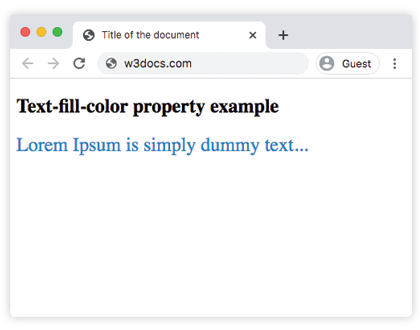
Exemple de la propriété text-fill-color avec la valeur "transparent" :
Exemple de la propriété CSS text-fill-color
<!DOCTYPE html>
<html>
  <head>
    <title>Title of the document</title>
    <style>
      article {
        padding: 10px;
        margin: 15px auto;
        font-size: 18px;
      }
      p {
        color: #444;
        line-height: 1.6;
        margin: 20px 0;
        background: #E7E7E2;
      }
      q {
        display: block;
        margin: 25px 0;
        text-transform: uppercase;
        text-align: center;
        font-family: sans-serif;
        font-size: 30px;
        color: #8e2b88;
        -webkit-text-fill-color: transparent;
        background: linear-gradient(to bottom, #ff0052, #8e2b88);
        -webkit-background-clip: text;
        background-clip: text;
      }
      q:before {
        content: '';
      }
    </style>
  </head>
  <body>
    <article>
      <p>
        Contrary to popular belief, Lorem Ipsum is not simply random text. It has roots in a piece of classical Latin literature from 45 BC, making it over 2000 years old.
      </p>
      <q>
        The text-fill-color property is used with -webkit- extension.
      </q>
      <p>
        There are many variations of passages of Lorem Ipsum available, but the majority have suffered alteration in some form, by injected humour, or randomised words which don't look even slightly believable. If you are going to use a passage of Lorem Ipsum, you need to be sure there isn't anything embarrassing hidden in the middle of text.
      </p>
    </article>
  </body>
</html>Exemple d'utilisation de la propriété text-fill-color pour définir un dégradé horizontal :
Exemple de la propriété text-fill-color avec une valeur transparente
<!DOCTYPE html>
<html>
  <head>
    <title>Title of the document</title>
    <style>
      h1 {
        display: inline-block;
        font-family: sans-serif;
        font-weight: bold;
        font-size: 40pt;
        background: linear-gradient(to right, rgb(25, 76, 192), rgb(196, 26, 3) 20%, rgb(236, 190, 6) 40%, rgb(25, 76, 192) 60%, rgb(3, 116, 8) 80%, rgb(196, 26, 3));
        -webkit-background-clip: text;
        background-clip: text;
        -webkit-text-fill-color: transparent;
      }
    </style>
  </head>
  <body>
    <h1>Cascading Style Sheets (CSS)</h1>
  </body>
</html>Valeurs
| Valeur | Description |
|---|---|
| color | Spécifie la couleur de remplissage au premier plan du contenu textuel de l'élément. Les noms de couleurs, les codes hexadécimaux, rgb(), rgba(), hsl(), hsla() peuvent être utilisés. |
| initial | Définit la valeur par défaut de la propriété. |
| inherit | Hérite la propriété de son élément parent. |
Pratique
Que pouvez-vous dire sur la propriété CSS 'text-fill-color' selon les informations fournies sur la page ?