Propriété CSS justify-content
La propriété justify-content aligne les éléments lorsque ceux-ci n’utilisent pas tout l’espace disponible le long de l’axe principal. Elle contrôle l’alignement des éléments qui débordent de la ligne. Cette propriété est une sous-propriété du module Flexible Box Layout.
La propriété justify-content est l’une des propriétés CSS3.
INFO
La propriété justify-content doit être utilisée avec la propriété display définie sur "flex". Pour aligner les éléments verticalement, utilisez la propriété align-items.
| Initial Value | flex-start |
|---|---|
| Applies to | Flex containers. |
| Inherited | No. |
| Animatable | No. |
| Version | CSS3 |
| DOM Syntax | object.style.justifyContent = "center"; |
Syntaxe
Syntaxe CSS de justify-content
justify-content: flex-start | flex-end | center | space-between | space-around | space-evenly | initial | inherit;Exemple de la propriété justify-content :
Exemple de code CSS justify-content
<!DOCTYPE html>
<html>
  <head>
    <title>Title of the document </title>
    <style>
      .center {
        width: 400px;
        height: 150px;
        border: 1px solid #666;
        display: flex;
        justify-content: center;
      }
      .center div {
        width: 70px;
        height: 70px;
        background-color: #ccc;
        border: 1px solid #666;
      }
    </style>
  </head>
  <body>
    <h2>Justify-content property example</h2>
    <p>Here the "justify-content: center" is set:</p>
    <div class="center">
      <div>1</div>
      <div>2</div>
      <div>3</div>
    </div>
  </body>
</html>Résultat
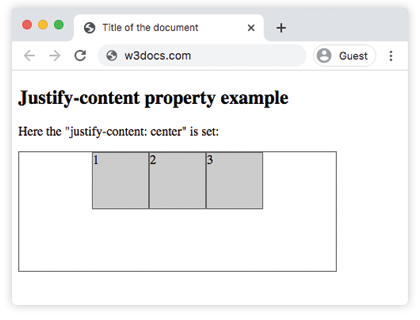
Exemple de la propriété justify-content avec la valeur "flex-start" :
Exemple CSS justify-content flex-start
<!DOCTYPE html>
<html>
  <head>
    <title>Title of the document </title>
    <style>
      .start {
        width: 400px;
        height: 150px;
        border: 1px solid #666;
        display: flex;
        justify-content: flex-start;
      }
      .start div {
        width: 70px;
        height: 70px;
        background-color: #ccc;
        border: 1px solid #666;
      }
    </style>
  </head>
  <body>
    <h2>Justify-content property example</h2>
    <p>Here the "justify-content: flex-start" is set:</p>
    <div class="start">
      <div>1</div>
      <div>2</div>
      <div>3</div>
    </div>
  </body>
</html>Exemple de la propriété justify-content avec la valeur "flex-end" :
Exemple CSS justify-content flex-end
<!DOCTYPE html>
<html>
  <head>
    <title>Title of the document </title>
    <style>
      .end {
        width: 400px;
        height: 150px;
        border: 1px solid #666;
        display: flex;
        justify-content: flex-end;
      }
      .end div {
        width: 70px;
        height: 70px;
        background-color: #ccc;
        border: 1px solid #666;
      }
    </style>
  </head>
  <body>
    <h2>Justify-content property example</h2>
    <p>Here the "justify-content: flex-end" is set:</p>
    <div class="end">
      <div>1</div>
      <div>2</div>
      <div>3</div>
    </div>
  </body>
</html>Exemple de la propriété justify-content avec la valeur "space-between" :
Exemple CSS justify-content space-between
<!DOCTYPE html>
<html>
  <head>
    <title>Title of the document </title>
    <style>
      .space-between {
        width: 400px;
        height: 150px;
        border: 1px solid #666;
        display: flex;
        justify-content: space-between;
      }

      .space-between div {
        width: 70px;
        height: 70px;
        background-color: #ccc;
        border: 1px solid #666;
      }
    </style>
  </head>
  <body>
    <h2>Justify-content property example</h2>
    <p>Here the "justify-content: space-between" is set:</p>
    <div class="space-between">
      <div>1</div>
      <div>2</div>
      <div>3</div>
    </div>
  </body>
</html>Exemple de la propriété justify-content avec la valeur "space-around" :
Exemple CSS justify-content space-around
<!DOCTYPE html>
<html>
  <head>
    <title>Title of the document </title>
    <style>
      .space-around {
        width: 400px;
        height: 150px;
        border: 1px solid #666;
        display: flex;
        justify-content: space-around;
      }
      .space-around div {
        width: 70px;
        height: 70px;
        background-color: #ccc;
        border: 1px solid #666;
      }
    </style>
  </head>
  <body>
    <h2>Justify-content property example</h2>
    <p>Here the "justify-content: space-around" is used:</p>
    <div class="space-around">
      <div>1</div>
      <div>2</div>
      <div>3</div>
    </div>
  </body>
</html>Valeurs
| Value | Description | Play it |
|---|---|---|
| flex-start | Les éléments commencent au début du conteneur. | Play it » |
| flex-end | Les éléments sont placés à la fin du conteneur. | Play it » |
| center | Les éléments sont placés au centre du conteneur. | Play it » |
| space-around | Il y a de l’espace avant, entre et après les éléments. | Play it » |
| space-between | Il y a de l’espace entre les éléments. | Play it » |
| space-evenly | L’espace est égal avant, entre et après les éléments. | Play it » |
| initial | Fait utiliser à la propriété sa valeur par défaut. | Play it » |
| inherit | Hérite de la propriété de son élément parent. |
Practice
What does the 'justify-content' property in CSS do?