Propriété CSS outline-style
La propriété outline-style définit le style d’un contour.
Elle est similaire à la propriété border, mais il existe une différence. Le contour se trouve à l’extérieur de la bordure d’un élément et n’occupe pas d’espace. Par défaut, il est dessiné autour des quatre côtés d’un élément.
La propriété outline-style accepte les valeurs suivantes :
- none
- hidden
- dotted
- dashed
- solid
- double
- groove
- ridge
- inset
- outset
Les propriétés width et height d’un élément n’incluent pas la largeur du contour, car le contour n’est pas considéré comme faisant partie des dimensions de l’élément.
| Valeur initiale | none |
|---|---|
| S’applique à | Tous les éléments. |
| Héritée | Non. |
| Animable | Non. |
| Version | CSS2 |
| Syntaxe DOM | object.style.outlineStyle = "dotted" |
Syntaxe
Syntaxe CSS de outline-style
outline-style: none | hidden | dotted | dashed | solid | double | groove | ridge | inset | outset | initial | inherit;Exemple de la propriété outline-style :
Exemple de la propriété outline-style :
<!DOCTYPE html>
<html>
  <head>
    <title>Title of the document</title>
    <style>
      .p1 {
        outline-style: solid;
      }
      .p2 {
        outline-style: dashed;
      }
      .p3 {
        outline-style: dotted;
      }
      .p4 {
        outline-style: double;
      }
      .p5 {
        outline-style: none;/*hidden*/
      }
      .p6 {
        outline-style: groove;
        outline-color: #ccc;
      }
      .p7 {
        outline-style: ridge;
        outline-color: #ccc;
      }
      .p8 {
        outline-style: inset;
        outline-color: #ccc;
      }
      .p9 {
        outline-style: outset;
        outline-color: #ccc;
      }
    </style>
  </head>
  <body>
    <h2>Outline property example</h2>
    <p class="p1">This is a paragraph with outline set to solid.</p>
    <p class="p2">This is a paragraph with outline set to dashed.</p>
    <p class="p3">This is a paragraph with outline set to dotted.</p>
    <p class="p4">This is a paragraph with outline set to double.</p>
    <p class="p5">This is a paragraph with outline set to none.</p>
    <p class="p6">This is a paragraph with outline set to groove.</p>
    <p class="p7">This is a paragraph with outline set to ridge.</p>
    <p class="p8">This is a paragraph with outline set to inset.</p>
    <p class="p9">This is a paragraph with outline set to outset.</p>
  </body>
</html>Résultat
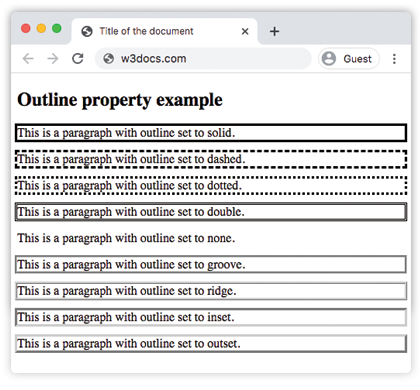
Exemple de la propriété outline-style avec toutes les valeurs :
Autre exemple de code CSS outline-style
<!DOCTYPE html>
<html>
  <head>
    <title>Title of the document</title>
    <style>
      p.dotted {
        outline: 4px dotted gray;
      }
      p.dashed {
        outline: 0.2em dashed rgb(142, 191, 66);
      }
      p.solid {
        outline: 4px solid #ccc;
      }
      p.double {
        outline: 4px double #000;
      }
      p.groove {
        outline: 4px groove #666;
      }
      p.ridge {
        outline: thick ridge #1c87c9;
      }
      p.inset {
        outline: medium inset #1c87c9;
      }
      p.outset {
        outline: 4px outset #1c87c9;
      }
    </style>
  </head>
  <body>
    <h2>Outline property example</h2>
    <p class="dotted">Lorem Ipsum is simply dummy text of the printing...</p>
    <p class="dashed">Lorem Ipsum is simply dummy text of the printing...</p>
    <p class="solid">Lorem Ipsum is simply dummy text of the printing...</p>
    <p class="double">Lorem Ipsum is simply dummy text of the printing...</p>
    <p class="groove">Lorem Ipsum is simply dummy text of the printing...</p>
    <p class="ridge">Lorem Ipsum is simply dummy text of the printing...</p>
    <p class="inset">Lorem Ipsum is simply dummy text of the printing...</p>
    <p class="outset">Lorem Ipsum is simply dummy text of the printing...</p>
  </body>
</html>Exemple de la propriété outline-style avec la valeur "groove" :
Exemple de la propriété outline-style avec la valeur groove
<!DOCTYPE html>
<html>
  <head>
    <title>Title of the document</title>
    <style>
      p {
        color: #7f7fa7;
        text-align: center;
        outline-width: 8px;
        outline-style: groove;
        padding: 10px;
      }
    </style>
  </head>
  <body>
    <h1>Outline property example</h1>
    <p>This is a paragraph with outline set to groove.</p>
  </body>
</html>Exemple de la propriété outline-style avec la valeur "ridge" :
Exemple de la propriété outline-style avec la valeur ridge
<!DOCTYPE html>
<html>
  <head>
    <title>Title of the document</title>
    <style>
      p {
        color: #69afad;
        text-align: center;
        outline-width: 8px;
        outline-style: ridge;
        padding: 10px;
      }
    </style>
  </head>
  <body>
    <h1>Outline property example</h1>
    <p>This is a paragraph with outline set to ridge.</p>
  </body>
</html>Exemple de la propriété outline-style avec la valeur "inset" :
Exemple de la propriété outline-style avec la valeur inset
<!DOCTYPE html>
<html>
  <head>
    <title>Title of the document</title>
    <style>
      p {
        color: #69afad;
        text-align: center;
        outline-width: 8px;
        outline-style: inset;
        padding: 10px;
      }
    </style>
  </head>
  <body>
    <h1>Outline property example</h1>
    <p>This is a paragraph with outline set to ridge.</p>
  </body>
</html>Exemple de la propriété outline-style avec la valeur "outset" :
Exemple de la propriété outline-style avec la valeur outset :
<!DOCTYPE html>
<html>
  <head>
    <title>Title of the document</title>
    <style>
      p {
        color: #69afad;
        text-align: center;
        outline-width: 8px;
        outline-style: outset;
        padding: 10px;
      }
    </style>
  </head>
  <body>
    <h1>Outline property example</h1>
    <p>This is a paragraph with outline set to ridge.</p>
  </body>
</html>Exemple de la propriété outline-style avec la valeur "dotted" :
Exemple de la propriété outline-style avec la valeur dotted :
<!DOCTYPE html>
<html>
  <head>
    <title>Title of the document</title>
    <style>
      p {
        color: #69afad;
        text-align: center;
        outline-width: 4px;
        outline-style: dotted;
        padding: 10px;
      }
    </style>
  </head>
  <body>
    <h1>Outline property example</h1>
    <p>This is a paragraph with outline set to ridge.</p>
  </body>
</html>Exemple de la propriété outline-style avec la valeur "dashed" :
Exemple de la propriété outline-style avec la valeur dashed :
<!DOCTYPE html>
<html>
  <head>
    <title>Title of the document</title>
    <style>
      p {
        color: #69afad;
        text-align: center;
        outline-width: 4px;
        outline-style: dashed;
        padding: 10px;
      }
    </style>
  </head>
  <body>
    <h1>Outline property example</h1>
    <p>This is a paragraph with outline set to ridge.</p>
  </body>
</html>Valeurs
| Valeur | Description | Play it |
|---|---|---|
| none | N’affiche aucun contour. C’est la valeur par défaut de cette propriété. | Play it » |
| hidden | Définit un contour masqué. | Play it » |
| dotted | Le contour est spécifié sous forme de série de points. | Play it » |
| dashed | Le contour est spécifié sous forme de série de tirets. | Play it » |
| solid | Le contour est spécifié sous forme de lignes pleines. | Play it » |
| double | Le contour est spécifié sous forme de double ligne pleine. | Play it » |
| groove | Spécifie un contour 3D en creux. | Play it » |
| ridge | Spécifie un contour 3D en relief. | Play it » |
| inset | Spécifie un contour encastré. | Play it » |
| outset | Spécifie un contour en relief. | Play it » |
| initial | Définit la propriété sur sa valeur par défaut. | Play it » |
| inherit | Hérite la propriété de son élément parent. |
Practice
Which of the following are valid values for the 'outline-style' property in CSS?