Propriété CSS background-position
La propriété CSS background-position spécifie la position de départ d'une image d'arrière-plan.
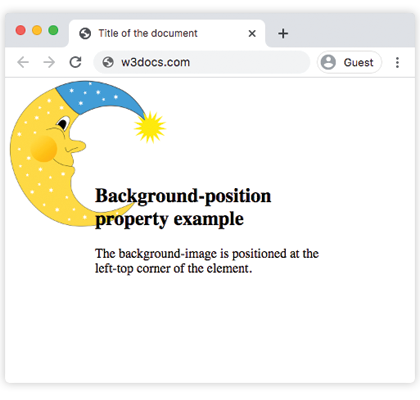
Par défaut, l'image d'arrière-plan est placée dans le coin supérieur gauche d'un élément. Si l'arrière-plan est défini pour se répéter, il se répétera à la fois verticalement et horizontalement.
| Valeur initiale | 0% 0% |
|---|---|
| S'applique à | Tous les éléments. S'applique également à ::first-letter et ::first-line. |
| Héritée | Non. |
| Animable | Oui. La position peut être modifiée. |
| Version | CSS1 |
| Syntaxe DOM | object.style.backgroundPosition = "center"; |
Syntaxe
Syntaxe de la propriété CSS background-position
background-position: value;Exemple de la propriété background-position :
Exemple de la propriété CSS background-position avec la valeur par défaut
<!DOCTYPE html>
<html>
  <head>
    <title>Title of the document</title>
    <style>
      body {
        padding: 102px;
        background-image: url("https://fr.w3docs.com/uploads/media/default/0001/02/55a2f152f59bf42a99b576d44a4578ec9daa0ab6.png");
        background-repeat: no-repeat;
        background-attachment: fixed;
        background-position: left top;
      }
    </style>
  </head>
  <body>
    <h2>Background-position property example</h2>
    <p>The background-image is positioned at the left-top corner of the element.</p>
  </body>
</html>Résultat
Exemple de la propriété background-position spécifiée en pourcentage :
Exemple de la propriété CSS background-position lorsque % (pourcentage) est utilisé
<!DOCTYPE html>
<html>
  <head>
    <title>Title of the document</title>
    <style>
      body {
        background-image: url("https://fr.w3docs.com/uploads/media/default/0001/02/55a2f152f59bf42a99b576d44a4578ec9daa0ab6.png");
        background-repeat: no-repeat;
        background-attachment: fixed;
        background-position: 50% 15%;
      }
    </style>
  </head>
  <body>
    <h2>Background-position property example</h2>
    <p>
      The background-image is positioned 50% from the left side and 15% from the top side of the element.
    </p>
  </body>
</html>Exemple de la propriété background-position en pixels :
Exemple de la propriété CSS background-position lorsque px est utilisé
<!DOCTYPE html>
<html>
  <head>
    <title>Title of the document</title>
    <style>
      body {
        padding: 100px;
        background-image: url("https://fr.w3docs.com/uploads/media/default/0001/02/55a2f152f59bf42a99b576d44a4578ec9daa0ab6.png");
        background-attachment: fixed;
        background-position: 5px 50px;
      }
    </style>
  </head>
  <body>
    <h2>Background-position property example</h2>
    <p>
      The background-image is positioned 5px from the left, and 50px down from the top.
    </p>
  </body>
</html>Exemple de la propriété background-position avec la valeur "right 100px" :
Exemple de la propriété background-position avec la valeur "right 100px" :
<!DOCTYPE html>
<html>
  <head>
    <title>Title of the document</title>
    <style>
      body {
        padding: 100px;
        background-image: url("https://fr.w3docs.com/uploads/media/default/0001/02/55a2f152f59bf42a99b576d44a4578ec9daa0ab6.png");
        background-repeat: no-repeat;
        background-attachment: fixed;
        background-position: right 100px;
      }
    </style>
  </head>
  <body>
    <h2>Background-position property example</h2>
    <p>The background-image is positioned 100px from the right edge, vertically centered.</p>
  </body>
</html>Exemple de la propriété background-position avec la valeur "center center" :
Exemple de la propriété background-position avec la valeur "center center" :
<!DOCTYPE html>
<html>
  <head>
    <title>Title of the document</title>
    <style>
      body {
        padding: 102px;
        background-image: url("https://fr.w3docs.com/uploads/media/default/0001/02/55a2f152f59bf42a99b576d44a4578ec9daa0ab6.png");
        background-attachment: fixed;
        background-position: center center;
      }
    </style>
  </head>
  <body>
    <h2>Background-position property example</h2>
    <p>The background-image is positioned center.</p>
  </body>
</html>Valeurs
| Valeur | Description | Tester » |
|---|---|---|
left, center, right, top, bottom | Définit la position de la image d'arrière-plan. Si une seule valeur est définie, l'autre est par défaut center. | Tester » |
x% y% | La première valeur définit la position horizontale et la seconde la position verticale. 0% 0% correspond au coin supérieur gauche. 100% 100% correspond au coin inférieur droit. Si une seule valeur est définie, l'autre est par défaut 50%. | Tester » |
xpos ypos | La première valeur définit la position horizontale et la seconde la position verticale. Les unités peuvent être des pixels (par ex. 0px 0px). | Tester » |
initial | Réinitialise la propriété à sa valeur par défaut. | Tester » |
inherit | Hérite de la propriété de son élément parent. |
Pratique
Quels paramètres peuvent être utilisés dans la propriété CSS background-position pour spécifier la position de l'image d'arrière-plan ?