Propriété CSS text-indent
La propriété text-indent spécifie la longueur de l'espace vide de la première ligne dans un bloc de texte. La direction du texte est définie par la propriété direction. Si une valeur négative est spécifiée, la première ligne sera indentée vers la gauche. text-indent ne s'applique qu'à la première ligne de texte d'un élément.
WARNING
Les valeurs "each-line" et "hanging" sont expérimentales.
| Valeur initiale | 0 |
|---|---|
| S'applique à | Conteneurs de bloc. |
| Héritée | Oui. |
| Animable | Oui. text-indent est animable. |
| Version | CSS1 |
| Syntaxe DOM | object.style.textIndent = "100px"; |
Syntaxe
Syntaxe de la propriété CSS text-indent
css
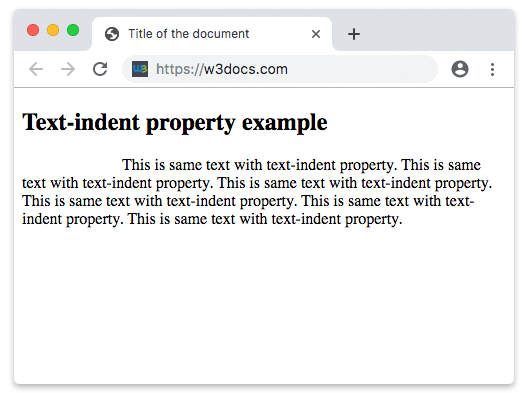
text-indent: length | percentage | each-line | hanging | initial | inherit;Exemple de la propriété text-indent :
Exemple de la propriété CSS text-indent avec une valeur en px
html
<!DOCTYPE html>
<html>
  <head>
    <title>Title of the document</title>
    <style>
      p {
        text-indent: 100px;
      }
    </style>
  </head>
  <body>
    <h2>Text-indent property example</h2>
    <p>
      This is same text with text-indent property. This is same text with text-indent property. This is same text with text-indent property. This is same text with text-indent property. This is same text with text-indent property. This is same text with text-indent property.
    </p>
  </body>
</html>Résultat
Exemple de la propriété text-indent spécifiée en "pt", "em", "%" et "cm" :
Exemple de la propriété CSS text-indent avec des valeurs en pt, cm, % et em
html
<!DOCTYPE html>
<html>
  <head>
    <title>Title of the document</title>
    <style>
      div.a {
        text-indent: 20pt;
      }
      div.b {
        text-indent: -5em;
      }
      div.c {
        text-indent: 70%;
      }
      div.d {
        text-indent: 4em;
      }
      div.e {
        text-indent: 5cm;
      }
    </style>
  </head>
  <body>
    <h2>Text-indent property example</h2>
    <h3>text-indent: 20pt</h3>
    <div class="a">
      Lorem Ipsum is simply dummy text of the printing and typesetting industry. Lorem Ipsum has been the industry's standard dummy text ever since the 1500s, when an unknown printer took a galley of type and scrambled it to make a type specimen book.
    </div>
    <h3>text-indent: -5em</h3>
    <div class="b">
      Lorem Ipsum is dummy text of the printing and typesetting industry. Lorem Ipsum has been the industry's standard dummy text ever since the 1500s when an unknown printer took a galley of type and scrambled it to make a type specimen book.
    </div>
    <h3>text-indent: 70%</h3>
    <div class="c">
      Lorem Ipsum is dummied text of the printing and typesetting industry. Lorem Ipsum has been the industry's standard dummy text ever since the 1500s when an unknown printer took a galley of type and scrambled it to make a type specimen book.
    </div>
    <h3>text-indent: 4em</h3>
    <div class="d">
      Lorem Ipsum is dummied text of the printing and typesetting industry. Lorem Ipsum has been the industry's standard dummy text ever since the 1500s when an unknown printer took a galley of type and scrambled it to make a type specimen book.
    </div>
    <h3>text-indent: 5cm</h3>
    <div class="e">
      Lorem Ipsum is dummied text of the printing and typesetting industry. Lorem Ipsum has been the industry's standard dummy text ever since the 1500s when an unknown printer took a galley of type and scrambled it to make a type specimen book.
    </div>
  </body>
</html>Valeurs
| Valeur | Description | Tester |
|---|---|---|
| length | Spécifie l'indentation en px, pt, cm, em, etc. La valeur par défaut est 0. Les valeurs négatives sont autorisées. | Tester » |
| percentage | Spécifie l'indentation en pourcentage de la largeur du bloc contenant. | Tester » |
| each-line | L'indentation affecte la première ligne ainsi que chaque ligne après un saut de ligne forcé, mais n'affecte pas les lignes après un retour à la ligne automatique. Cette valeur est une technologie expérimentale. | |
| hanging | Inverse les lignes indentées. La première ligne n'est pas indentée. Cette valeur est une technologie expérimentale. | |
| initial | Définit la valeur par défaut de la propriété. | Tester » |
| inherit | Hérite la propriété de son élément parent. |
Pratique
Que fait la propriété text-indent en CSS ?