Propriété CSS background-image
La propriété background-image spécifie les images d'arrière-plan pour les éléments. Vous pouvez spécifier une ou plusieurs images.
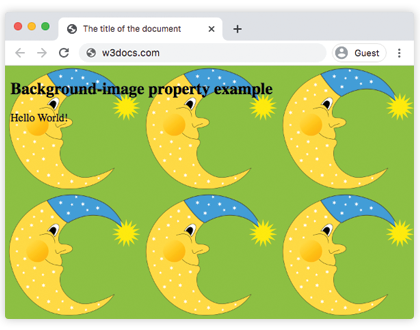
Par défaut, une image d'arrière-plan est répétée verticalement et horizontalement et placée dans le coin supérieur gauche de l'élément.
L'arrière-plan d'un élément correspond à sa taille totale, incluant le padding et la border (mais pas le margin).
Si l'image n'est pas disponible, vous devez spécifier une background-color.
| Valeur initiale | none |
|---|---|
| S'applique à | Tous les éléments. S'applique également à ::first-letter et ::first-line. |
| Héritée | Non. |
| Animable | Non. |
| Version | CSS1 + certaines nouvelles valeurs dans CSS3 |
| Syntaxe DOM | object.style.backgroundImage = "url(img_tree.png)"; |
Syntaxe
Syntaxe de la propriété CSS background-image
background-image: url | none | linear-gradient | radial-gradient | repeating-linear-gradient | repeating-radial-gradient | initial | inherit;Exemple de la propriété background-image :
Exemple de la propriété CSS background-image
<!DOCTYPE html>
<html>
  <head>
    <title>The title of the document</title>
    <style>
      body {
        background-image: url("https://fr.w3docs.com/uploads/media/default/0001/02/55a2f152f59bf42a99b576d44a4578ec9daa0ab6.png");
        background-color: #8ebf42;
      }
    </style>
  </head>
  <body>
    <h2>Background-image property example</h2>
    <p>Hello World!</p>
  </body>
</html>Résultat
Voir un autre exemple où deux images sont utilisées et spécifiées à l'aide de la propriété background-position.
Exemple de la propriété background-image avec d'autres propriétés d'arrière-plan :
Exemple de la propriété CSS background-image avec 2 images
<!DOCTYPE html>
<html>
  <head>
    <title>The title of the document</title>
    <style>
      body {
        padding: 100px;
        background-image: url("https://fr.w3docs.com/uploads/media/default/0001/02/55a2f152f59bf42a99b576d44a4578ec9daa0ab6.png"), url("https://fr.w3docs.com/uploads/media/default/0001/01/b408569013c0bb32b2afb0f0d45e93e982347951.jpeg");
        background-attachment: fixed;
        background-position: 5px 50px;
        background-repeat: no-repeat, repeat;
      }
    </style>
  </head>
  <body>
    <h2>Background-image property example</h2>
    <p>The background image is positioned 5px from the left, and 50px down from the top.</p>
  </body>
</html>Dans cet exemple, un "linear-gradient" avec deux couleurs est spécifié comme image d'arrière-plan pour un élément <div> :
Exemple de la propriété background-image avec la valeur "linear-gradient" :
Exemple de la propriété CSS background-image avec la valeur linear-gradient
<!DOCTYPE html>
<html>
  <head>
    <style>
      div {
        height: 300px;
        background-image: linear-gradient(#eee, #1c87c9);
      }
    </style>
  </head>
  <body>
    <h2>Linear gradient as a background image example</h2>
    <p>This linear gradient starts at the top. It starts gray, transitioning to blue:</p>
    <div></div>
  </body>
</html>Exemple de la propriété background-image avec la valeur "repeating-radial-gradient" :
Exemple de la propriété CSS background-image avec la valeur repeating-radial-gradient
<!DOCTYPE html>
<html>
  <head>
    <title>The title of the document</title>
    <style>
      div {
        height: 300px;
        background-color: #cccccc;
        background-image: repeating-radial-gradient(#8ebf42, #eee 15%, #ccc 30%);
      }
    </style>
  </head>
  <body>
    <h2>Radial gradient as a background image example</h2>
    <div></div>
  </body>
</html>Valeurs
| Valeur | Description |
|---|---|
| url | Définit l'URL de l'image. Plusieurs images peuvent être spécifiées, séparées par des virgules. |
| none | Aucune image d'arrière-plan ne sera affichée. C'est la valeur par défaut. |
| linear-gradient | Un dégradé linéaire est spécifié comme image d'arrière-plan. |
| radial-gradient | Un dégradé radial est spécifié comme image d'arrière-plan. |
| repeating-linear-gradient | Répète un dégradé linéaire. |
| repeating-radial-gradient | Répète un dégradé radial. |
| initial | Définit la propriété à sa valeur par défaut. |
| inherit | Hérite la propriété de son élément parent. |
Pratique
Quelles sont les propriétés CSS qui peuvent être utilisées pour contrôler l'image d'arrière-plan d'un élément ?