Propriété CSS flex-flow
La propriété flex-flow est considérée comme une propriété abrégée pour les propriétés flex-wrap et flex-direction.
Cette propriété fait partie des propriétés CSS3. Elle est incluse dans le module Flexible Box Layout.
S'il n'y a pas d'éléments flexibles, la propriété flex-flow n'aura aucun effet.
Les navigateurs modernes prennent en charge nativement la propriété flex-flow sans préfixes fournisseurs.
| Valeur initiale | row nowrap |
|---|---|
| S'applique à | Conteneurs flex |
| Héritée | Non. |
| Animable | Non. |
| Version | CSS3 |
| Syntaxe DOM | object.style.flexFlow = "column nowrap"; |
Syntaxe
Syntaxe de la propriété CSS flex-flow
flex-flow: <flex-direction> || <flex-wrap>;
/* ou */ initial | inherit;
Lorsque nous définissons flex-flow: row wrap;, cela signifie que la première valeur définit flex-direction, et la seconde définit la propriété flex-wrap.
Exemple de la propriété CSS flex-flow
flex-flow: row wrap;Le code suivant est identique au code ci-dessus.
Exemple des propriétés flex-direction et flex-wrap
flex-direction: row;
flex-wrap: wrap;
Exemple de la propriété flex-flow avec les valeurs "row" et "wrap" :
<!DOCTYPE html>
<html>
  <head>
    <title>Title of the document</title>
    <style>
      .example {
        width: 200px;
        height: 200px;
        border: 1px solid #c3c3c3;
        display: flex;
        flex-flow: row wrap;
      }
      .example div {
        width: 50px;
        height: 50px;
      }
    </style>
  </head>
  <body>
    <h2>Flex-flow property example</h2>
    <div class="example">
      <div style="background-color: #8ebf42;">A</div>
      <div style="background-color: #1c87c9;">B</div>
      <div style="background-color: #cccccc;">C</div>
      <div style="background-color: #666666;">D</div>
      <div style="background-color: #4c4a4a;">E</div>
      <div style="background-color: #c6c4c4;">F</div>
    </div>
  </body>
</html>Exemple de la propriété flex-flow avec les valeurs "wrap-reverse" et "column" :
<!DOCTYPE html>
<html>
  <head>
    <title>Title of the document</title>
    <style>
      .example {
        width: 200px;
        height: 200px;
        border: 1px solid #c3c3c3;
        display: flex;
        flex-flow: column wrap-reverse;
      }
      .example div {
        width: 50px;
        height: 50px;
      }
    </style>
  </head>
  <body>
    <h2>Flex-flow property example</h2>
    <div class="example">
      <div style="background-color: #8ebf42;">A</div>
      <div style="background-color: #1c87c9;">B</div>
      <div style="background-color: #cccccc;">C</div>
      <div style="background-color: #666666;">D</div>
      <div style="background-color: #4c4a4a;">E</div>
      <div style="background-color: #c6c4c4;">F</div>
    </div>
  </body>
</html>Exemple de la propriété flex-flow avec les valeurs "row" et "nowrap" :
<!DOCTYPE html>
<html>
  <head>
    <title>Title of the document</title>
    <style>
      .example {
        width: 200px;
        height: 200px;
        border: 1px solid #c3c3c3;
        display: flex;
        flex-flow: row nowrap;
      }
      .example div {
        width: 50px;
        height: 50px;
      }
    </style>
  </head>
  <body>
    <h2>Flex-flow property example</h2>
    <div class="example">
      <div style="background-color: #8ebf42;">A</div>
      <div style="background-color: #1c87c9;">B</div>
      <div style="background-color: #cccccc;">C</div>
      <div style="background-color: #666666;">D</div>
      <div style="background-color: #4c4a4a;">E</div>
      <div style="background-color: #c6c4c4;">F</div>
    </div>
  </body>
</html>Résultat
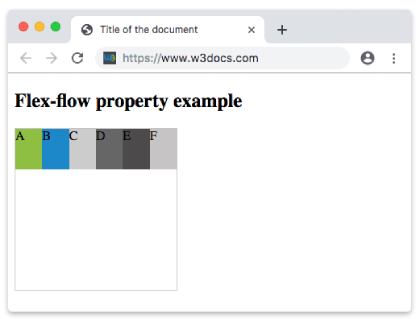
Exemple de la propriété flex-flow avec les valeurs "row-reverse" et "nowrap" :
<!DOCTYPE html>
<html>
  <head>
    <title>Title of the document</title>
    <style>
      .example {
        width: 200px;
        height: 200px;
        border: 1px solid #c3c3c3;
        display: flex;
        flex-flow: row-reverse nowrap;
      }
      .example div {
        width: 50px;
        height: 50px;
      }
    </style>
  </head>
  <body>
    <h2>Flex-flow property example</h2>
    <div class="example">
      <div style="background-color: #8ebf42;">A</div>
      <div style="background-color: #1c87c9;">B</div>
      <div style="background-color: #cccccc;">C</div>
      <div style="background-color: #666666;">D</div>
      <div style="background-color: #4c4a4a;">E</div>
      <div style="background-color: #c6c4c4;">F</div>
    </div>
  </body>
</html>Exemple de la propriété flex-flow avec les valeurs "column" et "nowrap" :
<!DOCTYPE html>
<html>
  <head>
    <title>Title of the document</title>
    <style>
      .example {
        width: 200px;
        height: 200px;
        border: 1px solid #c3c3c3;
        display: flex;
        flex-flow: column nowrap;
      }
      .example div {
        width: 50px;
        height: 50px;
      }
    </style>
  </head>
  <body>
    <h2>Flex-flow property example</h2>
    <div class="example">
      <div style="background-color: #8ebf42;">A</div>
      <div style="background-color: #1c87c9;">B</div>
      <div style="background-color: #cccccc;">C</div>
      <div style="background-color: #666666;">D</div>
      <div style="background-color: #4c4a4a;">E</div>
      <div style="background-color: #c6c4c4;">F</div>
    </div>
  </body>
</html>Exemple de la propriété flex-flow avec les valeurs "column-reverse" et "nowrap" :
<!DOCTYPE html>
<html>
  <head>
    <title>Title of the document</title>
    <style>
      .example {
        width: 200px;
        height: 200px;
        border: 1px solid #c3c3c3;
        display: flex;
        flex-flow: column-reverse nowrap;
      }
      .example div {
        width: 50px;
        height: 50px;
      }
    </style>
  </head>
  <body>
    <h2>Flex-flow property example</h2>
    <div class="example">
      <div style="background-color: #8ebf42;">A</div>
      <div style="background-color: #1c87c9;">B</div>
      <div style="background-color: #cccccc;">C</div>
      <div style="background-color: #666666;">D</div>
      <div style="background-color: #4c4a4a;">E</div>
      <div style="background-color: #c6c4c4;">F</div>
    </div>
  </body>
</html>Valeurs
| Valeur | Description | Tester |
|---|---|---|
| flex-direction | Définit la direction des éléments flexibles. Les valeurs possibles sont : row row-reverse column column-reverse initial inherit | Tester » |
| flex-wrap | Définit si les éléments flexibles doivent ou non passer à la ligne. Les valeurs possibles sont : nowrap wrap wrap-reverse initial inherit | Tester » |
| initial | Définit la valeur par défaut de la propriété. | Tester » |
| inherit | Hérite la propriété de son élément parent. |
Pratique
Quelles affirmations sont correctes concernant la propriété 'flex-flow' en CSS ?